
Logging a GenAI run to MLflow
Logging a GenAI run means recording one prompt, the model that answered, the answer text and its scores as a single MLflow run, so a language model's output is tracked the same way a number is.
Last updated: 15 Oct, 2026 · LLMOps
The Experiment tracking with MLflow lesson tracked plain settings and scores. A GenAI evaluation adds text: the prompt that went in and the answer that came out. The MLflow video wraps GPT-4 as an MLflow model with mlflow.openai.log_model, which is what fills the screen in the clip, then compares a generated answer against a ground-truth answer with mlflow.evaluate and metrics such as toxicity and answer similarity, which call a model and need a key. This lesson keeps it keyless: a deterministic stand-in answers, and two scores are computed in plain Python, so the shape of a GenAI run is what you practise.
Pointing MLflow at a local store
The setup is the local file store again, this time under a genai-eval experiment so these runs stay separate from the tracking lesson's.
import os
os.environ["MLFLOW_DISABLE_AGENT_HINT"] = "1"    # hush MLflow's agent hint while you learn
os.environ["MLFLOW_ALLOW_FILE_STORE"] = "true"   # 3.17 needs this opt-in for a local ./mlruns store
import shutil
shutil.rmtree("mlruns", ignore_errors=True)      # start from an empty store
os.makedirs("mlruns/.trash", exist_ok=True)

import mlflow
mlflow.set_tracking_uri("file:./mlruns")
mlflow.set_experiment("genai-eval")
A keyless stand-in and two scores
The stand-in returns a fixed answer, and faithfulness scores how much of that answer is grounded in the retrieved context. A second score is the answer's length in words. Both are deterministic, so the run is identical every time.
# a keyless stand-in answer, and two scores computed the same way every run
CONTEXT = "Our return window is 30 days from delivery. A refund takes 5 to 7 days."

def answer(question):
    return "You can return an order within 30 days of delivery."

def faithfulness(reply, context):
    # the share of the reply's words that appear in the retrieved context
    words = reply.lower().replace(".", "").split()
    grounded = sum(1 for w in words if w in context.lower().replace(".", "").split())
return round(grounded / len(words), 2)faithfulness is a word-overlap stand-in, not a real grader. A production score comes from a judge model or a library such as DeepEval or Promptfoo. The point here is the MLflow plumbing: where the prompt, the answer and the scores go, not how the score is computed.Logging the evaluation row
The inputs go in as parameters, the scores as metrics, and the answer text as an artifact: a file stored with the run. One run now holds the whole evaluation of one prompt.
prompt = "What is your return window?"
reply = answer(prompt)

# log one evaluation row: inputs as params, scores as metrics, the reply as an artifact
with mlflow.start_run(run_name="return-window"):
    mlflow.log_param("prompt", prompt)
    mlflow.log_param("model", "shop-stand-in")
    mlflow.log_metric("faithfulness", faithfulness(reply, CONTEXT))
    mlflow.log_metric("answer_length", len(reply.split()))
    mlflow.set_tag("eval", "question-answering")
    mlflow.log_text(reply, "answer.txt")

print("faithfulness :", faithfulness(reply, CONTEXT))
print("answer_length:", len(reply.split()))faithfulness : 0.4 answer_length: 10
Reading the row back
The prompt, model and scores read back from the run's columns, and the answer comes back as an artifact file listed beside them. Everything about that evaluation is in one place.
from mlflow.tracking import MlflowClient
client = MlflowClient()

# read the row back: the scored run, and the answer saved beside it
row = mlflow.search_runs(experiment_names=["genai-eval"]).iloc[0]
print("prompt       :", row["params.prompt"])
print("model        :", row["params.model"])
print("faithfulness :", row["metrics.faithfulness"])
print("answer_length:", row["metrics.answer_length"])
print("eval tag     :", row["tags.eval"])

artifacts = [a.path for a in client.list_artifacts(row["run_id"])]
print("artifacts :", artifacts)prompt : What is your return window? model : shop-stand-in faithfulness : 0.4 answer_length: 10.0 eval tag : question-answering artifacts : ['answer.txt']
What the row captured
- The prompt and model are parameters, so you can filter later for every run of one prompt or one model.
- The scores are metrics, so they sort and chart the way any tracked number does.
- The answer is an artifact, kept as
answer.txtbeside the run, so you can read what the model said, not only its scores.
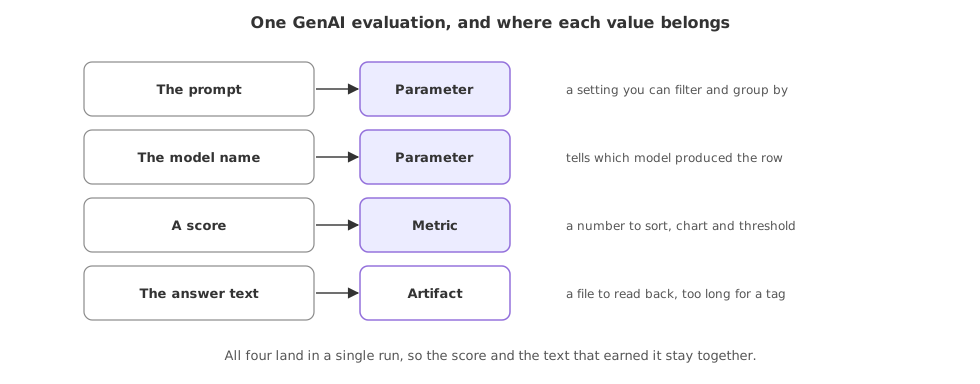
Where each value belongs
| Value | Logged as | Why there |
|---|---|---|
| The prompt | Parameter | A setting you can filter and group by |
| The model name | Parameter | Tells which model produced the row |
| A score | Metric | A number to sort, chart and threshold |
| The answer text | Artifact | A file to read back, too long for a tag |
Where you use a GenAI run
- An evaluation set, logging one run per prompt so the whole set is one experiment you can read as a table.
- A before-and-after, comparing a prompt change by its scores and its saved answers.
- An audit of outputs, keeping the exact text a model returned next to the score it earned.
Related
- Previous: Experiment tracking with MLflow
- Next: What to evaluate: RAG vs a plain LLM
- Reference: DeepEval overview
- Reference: Promptfoo overview
- Change the stand-in answer to one fully grounded in
CONTEXTand watch the faithfulness score rise. - Log a second prompt as its own run and read both rows back as one table.
- Open
answer.txtfrom the run's artifacts folder and confirm it holds the exact reply.
Little by little, you're building something great.