
Packaging the app in a container
A container packages the app from Part 4, its Python version, its dependencies and its entry command, into one image that runs the same on your laptop, a teammate's machine or a cloud host.
Last updated: 15 Oct, 2026 · LLMOps
The Deployment choices, and why lesson named the container as the common middle ground for serving an app. A container is built from a Dockerfile, a short recipe that layers the image step by step. This lesson writes one for the FastAPI shop assistant and shows the two commands that build and run it. The commands are shown, not run here, because building an image needs Docker installed on the machine.
A Dockerfile for the FastAPI app
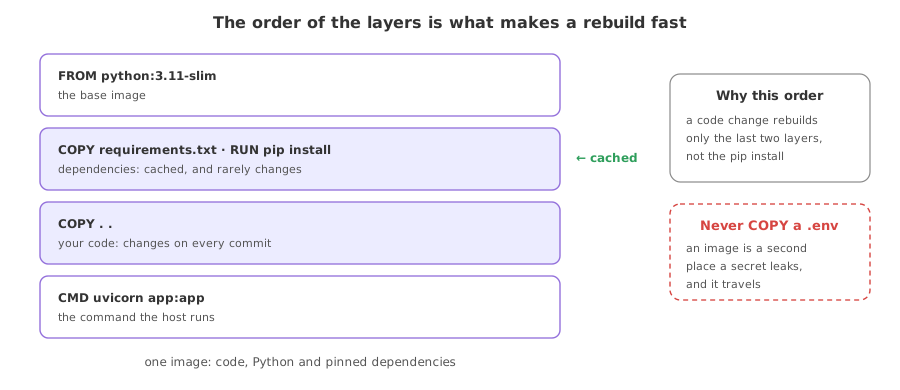
The recipe starts from a slim Python base, installs the dependencies from requirements.txt in their own layer so a code change does not reinstall them, copies the project, and ends with the command that serves the app. The final line is the same uvicorn invocation that runs the Part 4 entry point, here bound to the container's own port.
FROM python:3.11-slim
WORKDIR /app

# install dependencies first so this layer is cached across code changes
COPY requirements.txt .
RUN pip install --no-cache-dir -r requirements.txt

# copy the app and serve it with uvicorn on the container's port
COPY . .
EXPOSE 8000
CMD ["uvicorn", "app:app", "--host", "0.0.0.0", "--port", "8000"]
Building and running the image
Two commands turn the recipe into a running app: build reads the Dockerfile and produces a named image, and run starts a container from it and maps the container's port to a port on the host. Both need Docker on the machine, so they are shown rather than run in this course.
docker build -t shop-assistant .
docker run -p 8000:8000 shop-assistant
With the container running, the app answers on the mapped port exactly as it did when you started it by hand, the difference being that the image carries its own Python and dependencies and needs none installed on the host.
What the container gave you
- One artifact, so the app, its Python version and its pinned dependencies ship together and run the same everywhere.
- A cached dependency layer, because requirements are installed before the code is copied, so editing the app rebuilds fast.
- A host-independent unit, which is what a cloud service or an orchestrator schedules, and what the next lessons deploy.
A folder of files against a container image
| A folder of files | A container image | |
|---|---|---|
| Carries | Only your code | Code, Python and dependencies |
| Runs the same elsewhere | Only if the host matches | Yes, by design |
| Set up on a new host | Install Python and pip install | Pull the image and run |
| Scheduled by | Nothing; you start it | A cloud service or orchestrator |
Where a container earns its keep
- Shipping the app to any cloud, where the host runs the image without a matching Python environment.
- A reproducible run, where a teammate or a CI job gets the exact same environment from the image.
- The unit an orchestrator scales, where the next part runs many copies of the one image behind a load balancer.
.env file or an API key into the image, because anyone who pulls it can read it. Pass secrets in at run time as environment variables, and keep a .dockerignore so local keys and caches never land in the build.Related
- Previous: Deployment choices, and why
- Next: Serving an API and scaling it
- The app being packaged: The app entry point and its API
- Install Docker, then build and run the image and post a message to the app on the mapped port.
- Add a
.dockerignorethat excludes.envand__pycache__and confirm they stay out of the image. - Pass a setting as
docker run -eand read it in the app, instead of baking it into the image.
Every expert started right here.