
Deploying an open-source LLM on SageMaker
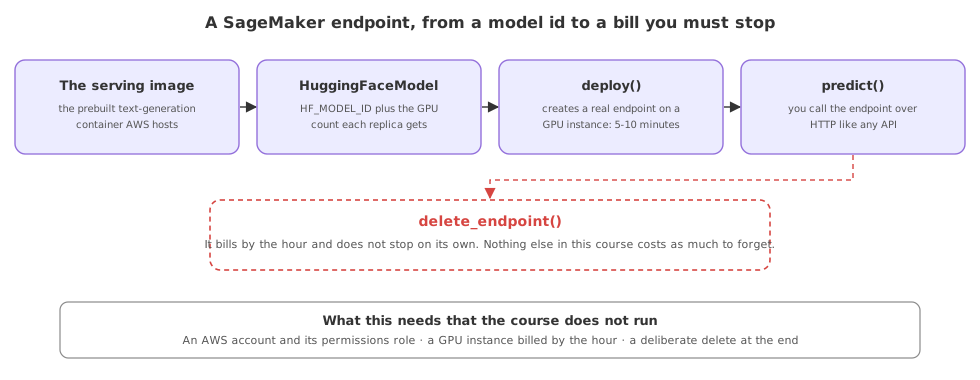
A SageMaker endpoint is AWS's managed way to host an open-source model: you point it at a model from Hugging Face and a GPU instance type, call deploy, and AWS runs the model behind an HTTP endpoint you call with predict.
Last updated: 15 Oct, 2026 · LLMOps
The Deployment choices, and why lesson named the model endpoint as the path for hosting your own model. SageMaker is that path on AWS, and it is what the Deploy open-source LLMs on AWS SageMaker video walks through, deploying a Falcon model from the Generative-AI-With-Cloud repository. The flow is shown here, not run, because it needs an AWS account and a GPU instance that bills by the hour. No output is shown, because nothing is deployed.
The managed serving image
You do not build a serving container yourself. SageMaker offers a prebuilt text-generation-inference image, and one call fetches its address so the model can be loaded into it.
# the SDK split at v3: these calls live in v2
#   pip install "sagemaker<3"
from sagemaker.huggingface import get_huggingface_llm_image_uri

# the prebuilt text-generation-inference container that AWS hosts
llm_image = get_huggingface_llm_image_uri("huggingface", version="0.8.2")pip install sagemaker now brings version 3, where sagemaker.huggingface no longer exists and the first line here fails to import. These snippets are the v2 API the video uses, so install sagemaker<3 to follow them. The version="0.8.2" below is the text-generation-inference build the recording pins; a current deployment would read the latest available instead.Describing the model and its instance
The model is described by its Hugging Face id and how many GPUs each copy is given, passed as environment settings to the managed image. Here it is Falcon 40B Instruct across four GPUs, the model deployed in the video.
import json
from sagemaker.huggingface import HuggingFaceModel

# the open-source model and the GPUs each replica is given
config = {
    "HF_MODEL_ID": "tiiuae/falcon-40b-instruct",
    "SM_NUM_GPUS": json.dumps(4),
    "MAX_INPUT_LENGTH": json.dumps(1024),
    "MAX_TOTAL_TOKENS": json.dumps(2048),
}

# wrap the model in the SageMaker-managed container image
llm_model = HuggingFaceModel(role=role, image_uri=llm_image, env=config)
Deploying and calling the endpoint
deploy provisions the GPU instance and loads the model, which the video notes takes five to ten minutes, and returns a predictor. Calling predict on it sends a prompt to the live endpoint and reads the generation back. The instance type here is ml.g5.12xlarge, the GPU box the repo uses.
# deploy creates a real endpoint on a GPU instance (5-10 minutes, billed)
predictor = llm_model.deploy(initial_instance_count=1,
                             instance_type="ml.g5.12xlarge")

# once the endpoint is live, send a prompt and read the generation
predictor.predict({"inputs": prompt, "parameters": {"max_new_tokens": 128}})
Deleting the endpoint when you are done
This is the step the video returns to again and again. A deployed endpoint holds a GPU instance and bills for every hour it exists, run or idle, so you delete it as soon as you finish. The repo ends on exactly these two calls.
# delete the endpoint the moment you are done, or it keeps billing
predictor.delete_model()
predictor.delete_endpoint()
What this flow needs that the course does not run
- An AWS account with SageMaker, and the permissions role the deploy call reads, which the course does not set up.
- A GPU instance, such as the
ml.g5.12xlargehere, which bills by the hour and is why nothing is deployed in this lesson. - A deliberate delete, because an endpoint left running is the most common surprise on an AWS bill.
A provider API against a SageMaker endpoint
| A provider API | A SageMaker endpoint | |
|---|---|---|
| You host | Nothing | The open-source model, on a GPU |
| The model | The provider's | Any Hugging Face model you pick |
| You pay for | Tokens per call | The GPU instance by the hour |
| Data stays in your cloud | No | Yes |
| You must remember to | Nothing | Delete the endpoint when done |
Where a SageMaker endpoint fits
- A privacy requirement, where an open-source model must run inside your own AWS account rather than a provider's.
- A fine-tuned open model, where there is no provider API because the weights are yours.
- A steady, high load, where a GPU instance you keep busy can be cheaper per request than per-token pricing.
Related
- Previous: Controlling the cost of API calls
- Next: The Azure deployment from the project
- Why you host your own model: Deployment choices, and why
- Read the Falcon notebook in the
Generative-AI-With-Cloudrepository and match each call to the steps above. - Look up the hourly price of an
ml.g5.12xlargeinstance and work out the cost of leaving it up for a day. - Find the autoscaling and delete controls for a SageMaker endpoint in the AWS docs, without creating one.
Slow is fine. Stopping is the only problem.