
The Azure deployment from the project
The Azure deployment in the flagship project runs the app on Azure managed services: the model is an Azure OpenAI deployment, storage and search are Azure services, and the app is orchestrated with LangGraph and observed with LangSmith rather than packed into a container.
Last updated: 15 Oct, 2026 · LLMOps
The Deploying an open-source LLM on SageMaker lesson hosted an open-source model on AWS. The end-to-end multimodal LLMOps project on Azure takes the other large cloud: the video calls the project an Azure multimodel compliance orchestration engine using LangGraph and LangSmith, built on Azure cloud with managed services. It is named here, not run, because it needs an Azure subscription and several paid Azure resources. No output is shown.
What the Azure deployment is built from
The architecture the video describes leans on Azure's managed services rather than on hosting a model yourself. Each piece of the app maps to an Azure resource you provision, and the model itself is one of them.
- Azure OpenAI hosts the model as a named deployment; the app reads the deployment name and the API version from the environment. This is the endpoint the app calls, the Azure equivalent of the model endpoint.
- Azure Blob Storage holds the uploaded files the project processes, the way an object store holds input data.
- Azure AI Search is the vector database the retrieval runs against, so the search index is a managed Azure resource.
- Azure Video Indexer does the OCR and transcript extraction, the multimodal front of the pipeline.
- LangGraph orchestrates the steps as a graph, and LangSmith gives the observability over the runs, the two tools named in the project's own title.
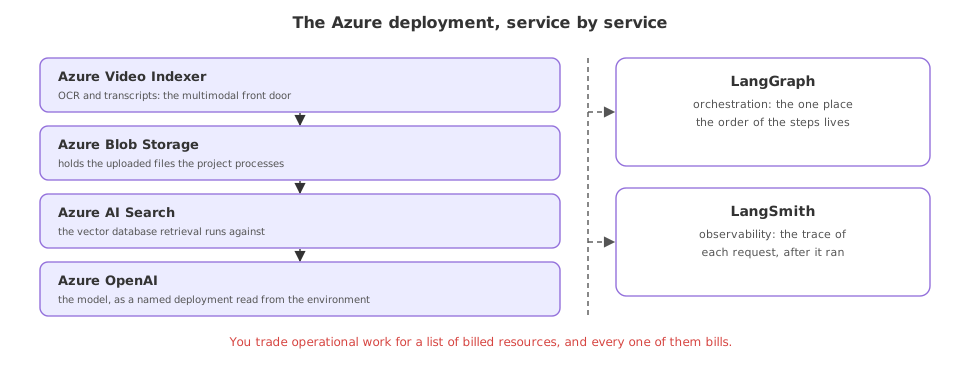
The model as an Azure deployment
The one piece of code worth seeing is how the app reaches the model. On Azure the model is not a provider endpoint you call by name; it is a deployment you created in your Azure OpenAI resource, and both its name and the API version come from the environment. The video reads exactly these two values from the project's .env.
import os
from langchain_openai import AzureChatOpenAI

# the model is an Azure OpenAI *deployment*, named in the environment
llm = AzureChatOpenAI(
    azure_deployment=os.getenv("AZURE_OPENAI_CHAT_DEPLOYMENT"),
    openai_api_version=os.getenv("AZURE_OPENAI_API_VERSION"),
)
Managed services or a container
The video shows how you would write a Dockerfile for the backend and then says the project does not use one, because we have Azure: the managed services take the place of hosting and scaling a container yourself. That is the trade this deployment makes, and it is worth naming against the container path from earlier in the part.
| The container path | The Azure managed path | |
|---|---|---|
| The model runs on | A GPU you host | Azure OpenAI, managed |
| Storage and search | You run them | Azure Blob and Azure AI Search |
| Scaling | You set it up | The Azure service handles it |
| You operate | The whole stack | Glue code and configuration |
| You pay for | The instances | Each Azure resource you use |
Where the Azure managed path fits
- A team already on Azure, where identity, billing and data governance are set up and a managed model fits straight in.
- A multimodal pipeline, where video, OCR, storage and search each have a ready Azure service to call.
- A compliance project, where keeping every resource inside one Azure subscription is the point, as the flagship's name says.
Related
- Previous: Deploying an open-source LLM on SageMaker
- Next: CI/CD for an LLM app
- The observability tool in the project: Tracing a run with LangSmith
- List the Azure resources the project names and match each to the job it does in the pipeline.
- Find where an Azure OpenAI deployment name and API version are set, and note why both live in the environment, not the code.
- Compare this managed path to the SageMaker endpoint and write down which operational jobs Azure takes off your hands.
This is what real progress feels like.