
Choosing an LLM: providers and model cards
Choosing an LLM is the model-selection stage: you weigh hosted providers against open-source models and read each candidate's model card for size, context window, cost and licence before you commit.
Last updated: 15 Oct, 2026 · LLMOps
Data for fine-tuning and the The RAG data pipeline decided how the model gets its knowledge. Model selection decides which model that is. The Detailed LLMOps Project Lifecycle video calls this out as its own stage: try several models, and read their numbers before picking one.
Hosted providers or open-source
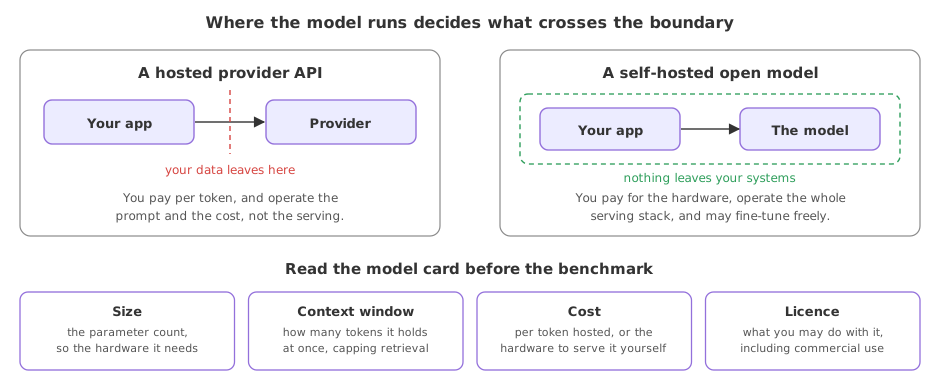
The first split is between calling a model through a provider API and running an open-source model yourself. The video names OpenAI, Anthropic and Google Gemini as providers you can try, and Hugging Face as where the open-source models and their details live.
- A provider API (OpenAI, Anthropic, Google Gemini) is a call away, kept current and scaled for you, and billed per token.
- An open-source model from Hugging Face you host yourself, which you can fine-tune and run in your own cloud for privacy, at the cost of running the serving infrastructure.
What a model card tells you
A model card is the spec sheet a model ships with. The video points at Hugging Face as the place to read the architecture, the size and the other numbers that decide whether a model fits. Four of those numbers do most of the deciding.
- Size, the parameter count, which sets how much hardware it takes to run and often how capable it is.
- Context window, how many tokens of input and output it can hold at once, which caps how much you can put in a prompt or retrieve into it.
- Cost, the price per token for a hosted model or the hardware to serve an open one.
- Licence, what you are allowed to do with an open model, including whether you may use it commercially.
| Hosted provider | Self-hosted open model | |
|---|---|---|
| You get it from | An API (OpenAI, Anthropic, Gemini) | Hugging Face, on your own hardware |
| You pay for | Tokens, per call | The hardware that serves it |
| Fine-tune freely | Only what the provider allows | Yes, it is your model |
| Data leaves your systems | Yes, to the provider | No, if you host it |
| You operate | The prompt and the cost | The whole serving stack |
How to pick
The lifecycle video's advice is plain: try several, then choose on the numbers and the constraints, not on reputation.
- Start from the task and the constraints. A privacy rule that forbids data leaving your systems rules out a hosted API before any quality test.
- Try more than one. Run the same evaluation set against each candidate and compare, rather than committing to the first that works.
- Read the card before the benchmark. Context window and licence can disqualify a model no matter how well it scores.
Where model selection bites
- A context window too small for the chunks you retrieve, found only after the RAG pipeline is built.
- A licence that forbids commercial use, found after a model is already in the product.
- A per-token cost that is fine in a demo and ruinous at production traffic.
Related
- Previous: Data for fine-tuning
- Next: Giving the model tools
- Reference: Hugging Face model hub
- Pick two candidate models for your task, one hosted and one open-source, and fill in the size, context window, cost and licence for each from their model cards.
- Find the context window of your chosen model and work out how many retrieved chunks you could fit alongside a question.
- Check the licence of one open model on Hugging Face and confirm whether it allows the use you have in mind.
Little by little, you're building something great.