
Packaging: setup.py, pyproject and requirements
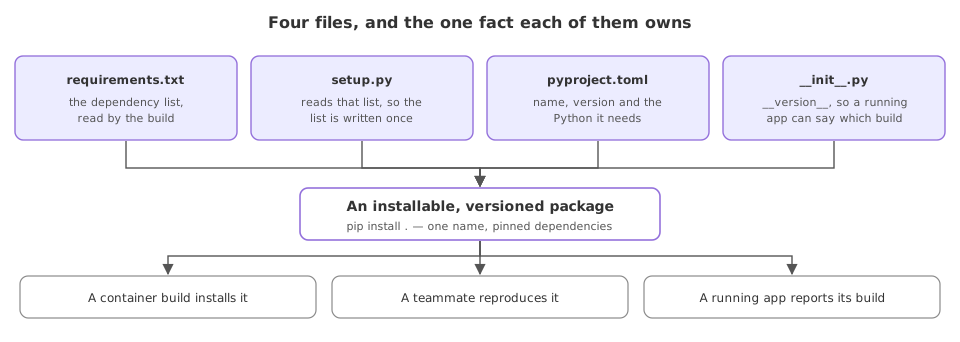
Packaging turns the folders into an installable, versioned project: a requirements.txt of dependencies, a setup.py that reads it, a pyproject.toml of metadata, and a version string the installed package reports.
Last updated: 15 Oct, 2026 · LLMOps
The The app entry point and its API lesson gave the app a seam for a server to run. Packaging is what lets that server, or a container, install the project by name instead of copying files. The repo carries all three files: a requirements.txt, a setup.py whose get_requirements reads it, and a pyproject.toml. This lesson shows each and runs one check that the installed package reports its version.
The dependency list
Every library the app imports is named here, one per line. This is the list a fresh environment installs, and the list the build reads.
fastapi
uvicorn
httpx2
pyyaml
pydantic
python-dotenv
mlflow
A setup.py that reads the requirements
The repo's setup.py keeps one source of truth: it reads requirements.txt and passes the lines to install_requires, dropping blanks and the editable -e . marker, so the list is written once. httpx2 is there because the test client in The app entry point and its API needs it, and mlflow because the tracking lessons import it.
from setuptools import find_packages, setup
from typing import List

def get_requirements() -> List[str]:
    # read requirements.txt, drop blanks and the editable "-e ." line
    requirements: List[str] = []
    with open("requirements.txt") as file:
        for line in file.readlines():
            line = line.strip()
            if line and line != "-e .":
                requirements.append(line)
    return requirements

setup(
    name="shop-assistant",
    version="0.1.0",
    packages=find_packages(),
    install_requires=get_requirements(),
)
Project metadata in pyproject.toml
pyproject.toml carries the project's name, version, the Python floor and its dependencies in the modern format. A build tool reads this file to produce the installable artifact.
[project]
name = "shop-assistant"
version = "0.1.0"
requires-python = ">=3.10"
dependencies = [
    "fastapi",
    "httpx2",
    "pyyaml",
    "pydantic",
    "mlflow",
]pyproject.toml wins: setuptools takes [project].dependencies and silently ignores the install_requires that setup.py computed. Let one file own the list. Keep it in requirements.txt and read it from setup.py, or declare it in pyproject.toml and drop the reader, but do not trust two lists to agree.The package reports its version
Make the top folder a package by giving it an __init__.py with a version string. Once it is importable, the running app can report exactly which version of itself is deployed.
# shop_assistant/__init__.py
__version__ = "0.1.0"import shop_assistant
print("package:", shop_assistant.__name__)
print("version:", shop_assistant.__version__)package: shop_assistant version: 0.1.0
What packaging gave the project
- One dependency list, read by the build, so an environment is reproduced from
requirements.txtrather than from memory. - A version on the package, so a running app and its logs can say which build is live, which matters the moment two versions exist.
- An installable name, so a container or a server pulls in the project with one install step instead of copying a folder.
A folder of scripts against an installed package
| A folder of scripts | An installed package | |
|---|---|---|
| Set it up | Copy files, hope for the best | Install by name |
| Dependencies | Implicit | Declared in one list |
| Version | None | A string the package reports |
| Imported by | A path hack | A normal import |
Where packaging matters
- A container build, where the image installs the project and its pinned dependencies in one layer.
- A reproducible environment, where a teammate or a CI job installs the same versions from the list.
- A deployed app that reports its build, where the version string ties a running process to a commit.
setup.py and a pyproject.toml is fine, but let one own each fact. Keep the dependency list in requirements.txt and read it, rather than writing the same libraries into both files, where the two copies drift apart and an install pulls the wrong set.Related
- Previous: The app entry point and its API
- Next: Experiment tracking with MLflow
- Reference: The AI_Trip_Planner project
- Bump
__version__to0.2.0and watch the import report the new value. - Add a dependency to
requirements.txt, callget_requirements()directly and confirm it is in the returned list, then check whetherpip install -e .installed it. - Install your own project with
pip install -e .and import it from another folder.
This is what real progress feels like.