
Node one: indexing the video
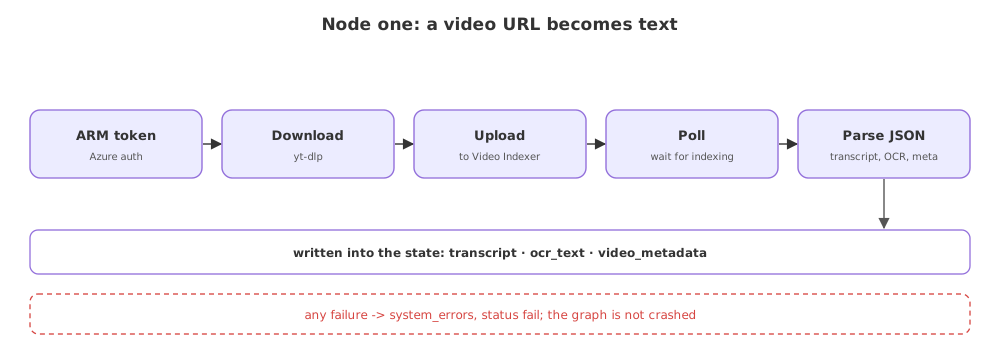
The first node turns a video URL into text the model can read. It downloads the video, uploads it to Azure Video Indexer, waits for the indexing to finish, and parses the result into the transcript and on-screen text the state carries forward.
Last updated: 15 Oct, 2026 · LLMOps
The graph state declared the fields; this node fills the first of them. It is the multimodal step: the input is a video, and this is where it becomes something an LLM can work with.
What the node does, in order
- Authenticate. It asks Azure for an ARM token, the management credential Video Indexer needs, then an account access token.
- Download. yt-dlp fetches the video from the URL to a temporary file.
- Upload and wait. The file is posted to Video Indexer, which returns a video ID; the node polls until indexing is done.
- Parse. The result comes back as JSON; the node pulls out the transcript, the OCR text and the metadata, and writes them into the state.
import logging
from services.video_indexer import index_and_extract   # the service wrapper

log = logging.getLogger("brand-guardian")

def index_video_node(state: VideoAuditState) -> dict:
    log.info("index node: uploading %s to video indexer", state["video_url"])
    try:
        result = index_and_extract(state["video_url"])   # ARM token, download, upload, poll, parse
    except Exception as exc:
        # a failed download or an Azure timeout is recorded, not raised into the graph
        return {"system_errors": [f"index node: {exc}"], "status": "fail"}
    log.info("index node: indexed video %s", result["video_id"])
    return {
        "transcript": result["transcript"],
        "ocr_text": result["ocr_text"],
        "video_metadata": result["metadata"],
    }
The node returns only the keys it filled, and LangGraph merges them into the state. A failure returns a system_errors entry and a fail status instead of raising, so one bad download does not crash the whole audit, the pattern from Custom exceptions you can trace.
Related
- Previous: The graph state the project passes around
- Next: Node two: the auditor
- Trace what the state looks like after this node runs on a video whose download fails.
- Explain why the node returns a dict of only the keys it changed, not the whole state.
Every expert started right here.