Decision tree classifier
A decision tree is a supervised learning algorithm that predicts by asking a chain of yes or no questions about the features, the same way nested if-else statements do.
Last updated: 04 Oct, 2026 · scikit-learn 1.9.1
K nearest neighbours (KNN) compares every new point with all the training points. A decision tree learns a short set of questions once; answering them for a new point leads straight to the prediction. The same idea solves both classification and regression.
Turning nested if-else into a tree
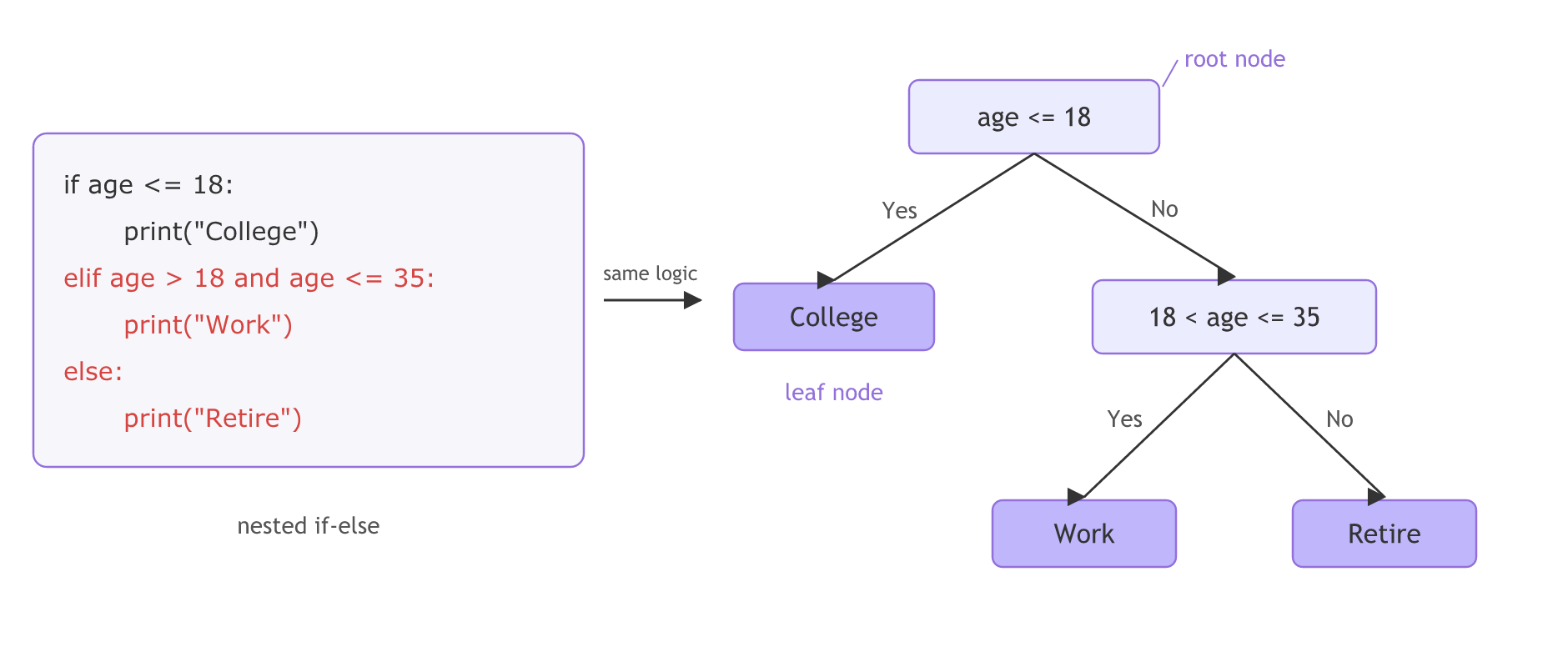
The video starts from plain code. If age is 18 or less, print "College". Else, if age is above 18 and at most 35, print "Work". Otherwise print "Retire".
Each condition becomes a node. The first condition, age ≤ 18, is the root node, where every prediction starts. Its Yes branch ends in College: a node with no more questions is a leaf node, and it holds the answer. Its No branch goes to the next condition, 18 < age ≤ 35, whose Yes branch is the Work leaf and whose No branch is the Retire leaf.
The second node on the board reads "<18 & <=35"; the condition is age > 18 and age ≤ 35, as the video corrects aloud. The board also leaves the Retire leaf undrawn; it is the last No branch.
Splitting play tennis on Outlook
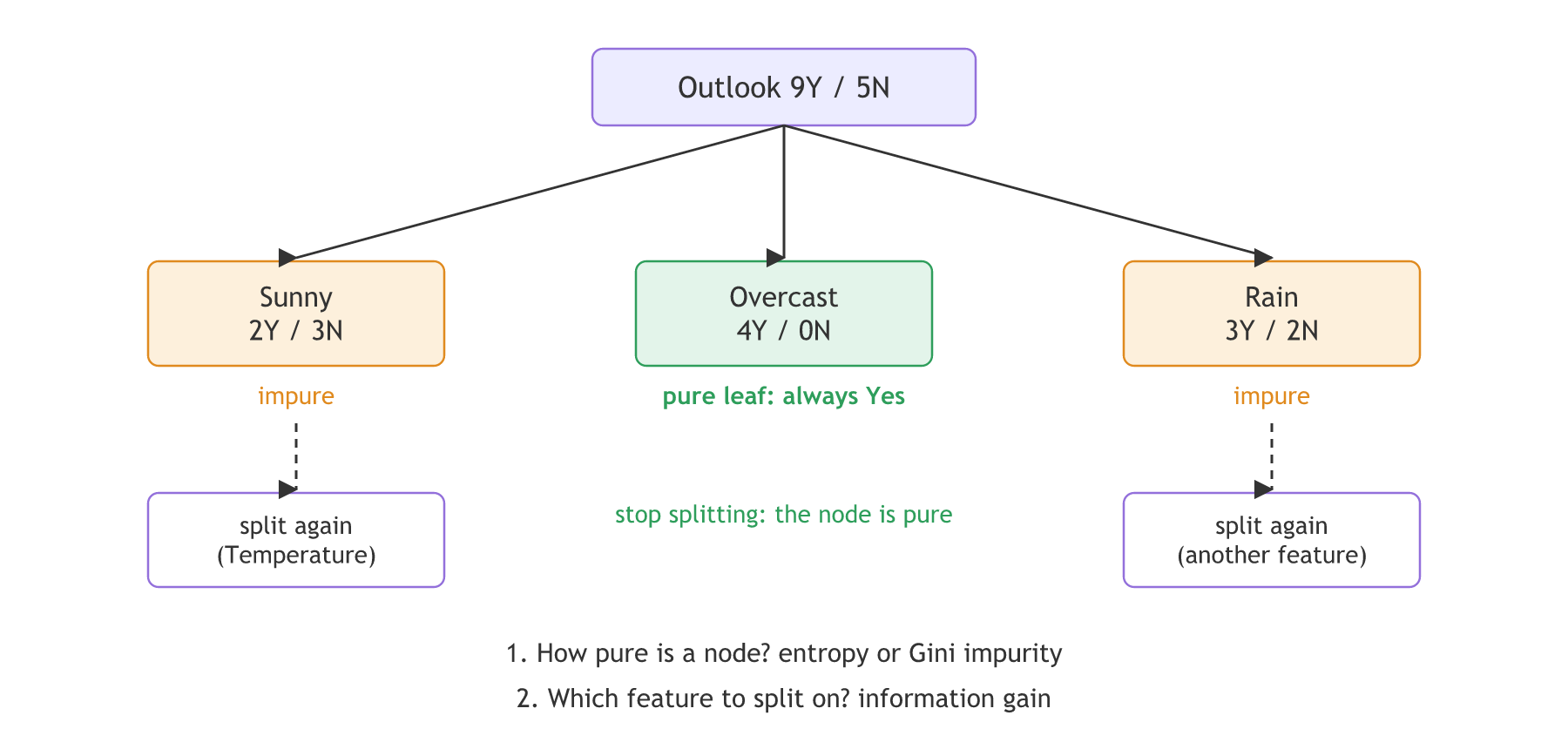
The video brings back the play-tennis table from the Naive Bayes worked example: 14 days, the inputs Outlook, Temperature, Humidity and Wind, and the output PlayTennis with 9 Yes and 5 No. The root node holds all 14 days, so it is written 9Y / 5N.
Pick Outlook as the first feature. It has three categories, so the root gets three children. Count the days in each: Sunny is 2 Yes and 3 No, Overcast is 4 Yes and 0 No, and Rain is 3 Yes and 2 No. The children add back up to 9 Yes and 5 No.
Why Outlook and not another feature? For now the video takes it at random and promises the answer later: Information gain is the rule that picks it. Overcast already holds only Yes days, so it needs no more questions. Sunny and Rain are mixed, so each is split again by another feature. How to measure that mix is the subject of Entropy and Gini impurity.
Learning the age rules with DecisionTreeClassifier
scikit-learn's DecisionTreeClassifier learns the questions from labelled examples. Give it a few ages labelled by the if-else rules and it finds the same two boundaries on its own.
The age rules as a function
def life_stage(age):
    if age <= 18:
        return "College"
    elif age > 18 and age <= 35:
        return "Work"
    else:
        return "Retire"
Learning the same rules from examples
from sklearn.tree import DecisionTreeClassifier, export_text

# Ten example people, labelled by the if-else rules
ages = [[10], [15], [18], [19], [25], [35], [36], [50], [60], [70]]
labels = [life_stage(a[0]) for a in ages]
age_tree = DecisionTreeClassifier(random_state=0).fit(ages, labels)print(export_text(age_tree, feature_names=["age"]))
for age in [16, 30, 40]:
print(age, "if-else:", life_stage(age), "| tree:", age_tree.predict([[age]])[0])|--- age <= 35.50 | |--- age <= 18.50 | | |--- class: College | |--- age > 18.50 | | |--- class: Work |--- age > 35.50 | |--- class: Retire 16 if-else: College | tree: College 30 if-else: Work | tree: Work 40 if-else: Retire | tree: Retire
What the learned age tree shows
- The thresholds are 18.5 and 35.5: the tree puts each cut halfway between two training ages it has seen (18 and 19, 35 and 36), so it agrees with the if-else on every whole age.
- The root asks age ≤ 35.5 first, not age ≤ 18. A tree is free to ask the questions in a different order, as long as the leaves give the same answers.
- 16, 30 and 40 get College, Work and Retire from both the function and the tree.
Fitting a tree on the play-tennis table
scikit-learn trees need numbers, so each category becomes its own 0/1 column first (one-hot encoding).
Typing the play-tennis table
import pandas as pd

# The 14 days of the play-tennis table, one string per column
outlook = "Sunny Sunny Overcast Rain Rain Rain Overcast Sunny Sunny Rain Sunny Overcast Overcast Rain".split()
temperature = "Hot Hot Hot Mild Cool Cool Cool Mild Cool Mild Mild Mild Hot Mild".split()
humidity = "High High High High Normal Normal Normal High Normal Normal Normal High Normal High".split()
wind = "Weak Strong Weak Weak Weak Strong Strong Weak Weak Weak Strong Strong Weak Strong".split()
play = "No No Yes Yes Yes No Yes No Yes Yes Yes Yes Yes No".split()

df = pd.DataFrame({"Outlook": outlook, "Temperature": temperature,
                   "Humidity": humidity, "Wind": wind, "PlayTennis": play})
One-hot encoding the categories
from sklearn.tree import DecisionTreeClassifier, export_text

# One 0/1 column per category: Outlook_Sunny, Outlook_Overcast, ...
X = pd.get_dummies(df.drop(columns="PlayTennis"), dtype=int)
y = df["PlayTennis"]print(pd.crosstab(df["Outlook"], df["PlayTennis"]), "\n")
tennis_tree = DecisionTreeClassifier(criterion="entropy", random_state=0).fit(X, y)
print(export_text(tennis_tree, feature_names=list(X.columns)))
print("depth:", tennis_tree.get_depth(), "leaves:", tennis_tree.get_n_leaves(),
"training accuracy:", tennis_tree.score(X, y))PlayTennis No Yes Outlook Overcast 0 4 Rain 2 3 Sunny 3 2 |--- Outlook_Overcast <= 0.50 | |--- Humidity_Normal <= 0.50 | | |--- Outlook_Rain <= 0.50 | | | |--- class: No | | |--- Outlook_Rain > 0.50 | | | |--- Wind_Strong <= 0.50 | | | | |--- class: Yes | | | |--- Wind_Strong > 0.50 | | | | |--- class: No | |--- Humidity_Normal > 0.50 | | |--- Wind_Weak <= 0.50 | | | |--- Temperature_Cool <= 0.50 | | | | |--- class: Yes | | | |--- Temperature_Cool > 0.50 | | | | |--- class: No | | |--- Wind_Weak > 0.50 | | | |--- class: Yes |--- Outlook_Overcast > 0.50 | |--- class: Yes depth: 4 leaves: 7 training accuracy: 1.0
What the play-tennis tree shows
- The Outlook counts match the board: Overcast 0 No and 4 Yes, Rain 2 and 3, Sunny 3 and 2.
- The first question is Outlook_Overcast ≤ 0.5: the tree starts by separating the 4 Overcast days, which all say Yes, from the rest. It picks Outlook first, as the video's tree does.
- Every question has two answers: scikit-learn asks "is it Overcast or not" instead of splitting Outlook three ways, so the other branches need extra questions.
- Depth 4, 7 leaves, training accuracy 1.0: the tree keeps splitting until every leaf is pure, so it fits all 14 days.
Multiway split vs binary split
Tree classifiers come in two families. ID3 gives a node one branch per category, as the video's Outlook tree does. CART (classification and regression trees) always makes two branches, and scikit-learn uses an optimised version of CART.
| The video's tree (one branch per category) | scikit-learn's tree (two branches) | |
|---|---|---|
| Outlook at the root | Sunny, Overcast and Rain at once | Overcast or not, then Rain or not later |
| Children per node | As many as the categories | Always 2 |
| Numeric features | Thresholds, as in the information gain lesson | Thresholds such as age <= 18.5 |
| Input | Category names | Numbers, so categories are one-hot encoded |
| Algorithm family | ID3 style | CART (classification and regression trees) |
Where you use decision trees
- Rules people must read: loan approval or triage rules, where the reason for each prediction has to be shown as a list of questions.
- Mixed tabular data: trees need no feature scaling, so ages, prices and 0/1 flags can sit side by side.
- The building block of ensembles: random forest and boosting combine many trees.
Related
- Previous: K nearest neighbours (KNN)
- Next: Entropy and Gini impurity
- Reference: scikit-learn user guide, Decision Trees
- Add the ages 30 and 33 to the age examples. Do the thresholds 18.5 and 35.5 move?
- Fit the play-tennis tree with
max_depth=1. What is the single question, and what does it predict on each side? - Predict a new day with the play-tennis tree: build a one-row DataFrame for (Rain, Mild, High, Weak), run it through
pd.get_dummies, and line its columns up with.reindex(columns=X.columns, fill_value=0)beforepredict.
Little by little, you're building something great.