Train and test split
A train and test split is a way of dividing a dataset into a training set that the model learns from and a test set that is held back to check how well the model predicts rows it has never seen.
Last updated: 05 Oct, 2026 · scikit-learn 1.9.1
A model scored on the same rows it trained on can look perfect and still fail on new data. Holding back part of the data gives an honest score.
Splitting with train_test_split
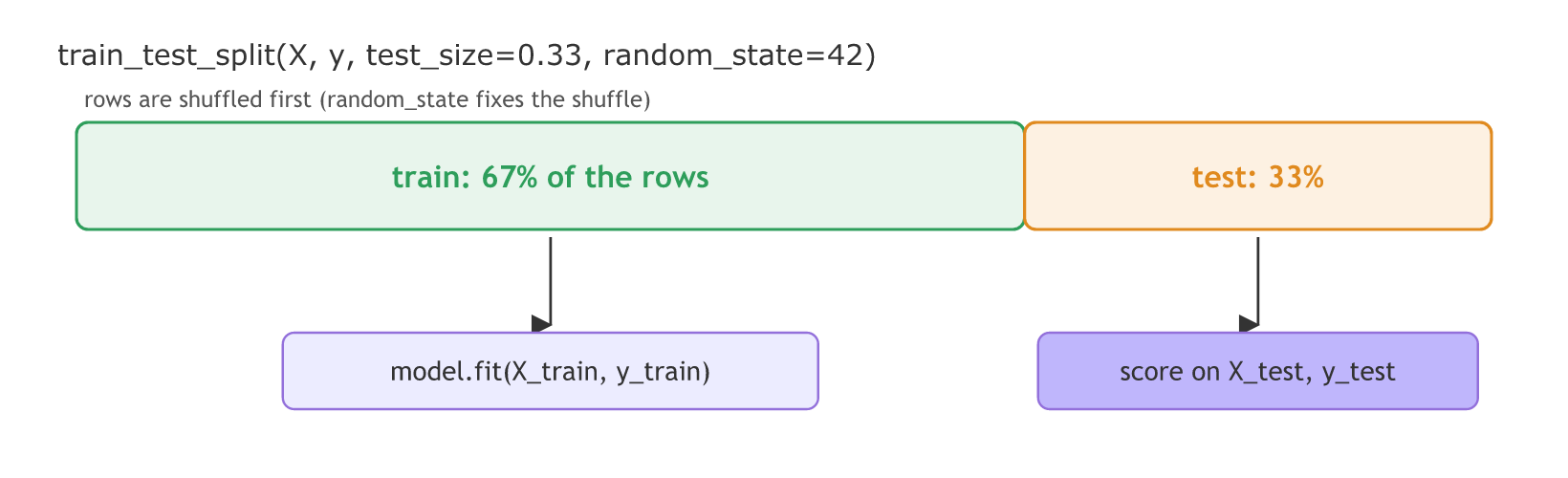
The video pastes the example from the scikit-learn docs: import train_test_split from sklearn.model_selection, give it X and y, a test_size of 0.33 and a random_state, and it returns four pieces: X_train, X_test, y_train and y_test. The random state can be any number.
The video says the train data will be 77%. With test_size=0.33 the test set holds 33% of the rows and the train set the other 67%.
The video splits the Boston housing table from load_boston(), which scikit-learn removed in 1.2. The split works the same way on any table. The run below uses the notes' height and weight table with the settings of the practical notebook, test_size=0.25 and random_state=42, and checks the video's 0.33 on a table of Boston's shape, 506 rows.
Loading the height and weight table
Weight is the input and height the output. X is a one-column table, which is why it has double brackets.
import pandas as pd

url = ("https://raw.githubusercontent.com/krishnaik06/The-Grand-Complete-Data-Science-Materials/"
       "main/Machine%20Learning/2-Complete%20Linear%20Regression/Practicals/height-weight.csv")
df = pd.read_csv(url)
X = df[["Weight"]]   # independent feature, as a one-column table
y = df["Height"]     # dependent feature
The four returned pieces
from sklearn.model_selection import train_test_split

# X: the feature columns, y: the output column
X_train, X_test, y_train, y_test = train_test_split(
    X, y, test_size=0.25, random_state=42)
test_size and random_state
- test_size as a float is the fraction of rows for the test set; as an int it is a row count. The test count is rounded up.
- random_state fixes the shuffle. The same number gives the same rows every run, so results repeat. The number itself means nothing; 42 is a habit.
- shuffle=True is the default: rows are mixed before the cut, so the test set is not the last rows of the file.
Splitting the 23-row table
import numpy as np

print("rows:", len(df), " train:", len(X_train), " test:", len(X_test))
print("test rows:", X_test.index.tolist())

again = train_test_split(X, y, test_size=0.25, random_state=42)[1]
other = train_test_split(X, y, test_size=0.25, random_state=7)[1]
print("same rows with 42 again:", again.index.equals(X_test.index))
print("test rows with 7:       ", other.index.tolist())

boston_shape = np.zeros((506, 13))   # the video's table: 506 rows, 13 features
train_b, test_b = train_test_split(boston_shape, test_size=0.33, random_state=42)
print("506 rows, test_size=0.33:", len(train_b), "train,", len(test_b), "test")rows: 23 train: 17 test: 6 test rows: [15, 9, 0, 8, 17, 12] same rows with 42 again: True test rows with 7: [1, 5, 2, 22, 20, 12] 506 rows, test_size=0.33: 339 train, 167 test
Reading the split
- 17 train rows and 6 test rows. 23 × 0.25 is 5.75, rounded up to 6 for the test set, which leaves 17 for training.
- The test rows are scattered through the table, because the rows are shuffled first.
- random_state=42 twice gives the same rows; random_state=7 gives a different set.
- The video's settings on 506 rows give 339 train and 167 test rows: 506 × 0.33 is 166.98, rounded up to 167, a 67% train share.
Scaling with the training rows only
The practical notebook standardises the weights next, with StandardScaler: subtract the mean, divide by the standard deviation. Both numbers must come from the training rows, because the test rows stand for data the model has never seen. So the scaler is fitted on X_train and only applied to X_test:
from sklearn.preprocessing import StandardScaler

scaler = StandardScaler()
X_train_scaled = scaler.fit_transform(X_train)   # learns the mean and spread from the train rows
X_test_scaled = scaler.transform(X_test) # reuses them on the test rowsprint("mean weight of the train rows:", round(scaler.mean_[0], 2))
print("scaled test weights:", X_test_scaled.ravel().round(4))mean weight of the train rows: 72.47 scaled test weights: [ 0.335 0.335 -1.6642 1.3648 -0.4526 1.9706]
These are the six values the notebook prints for X_test: 0.335, 0.335, −1.664, 1.365, −0.453 and 1.971. A scaled weight of 0 means the average training weight.
Train set vs test set
| Train set | Test set | |
|---|---|---|
| Purpose | The model learns its parameters from it | Checks the model on unseen rows |
| Used by | fit(X_train, y_train) | score or a metric on X_test, y_test |
| Seen during training | Yes | Never |
| Scaler | fit_transform | transform only |
| Share with test_size=0.25 | 75% | 25% |
Where you use train and test split
- Every supervised model in this course, from Simple linear regression onwards, trains on X_train and reports its score on X_test.
- Comparing two models fairly: score both on the same test rows by using the same
random_state. - Before cross-validation: split first, then cross-validate on the training part only, as Cross-validation shows.
fit_transform on X_test is the same leak in one line; Multiple linear regression shows what it does to a test score.Related
- Previous: Installing scikit-learn
- Next: Simple linear regression
- See also: Cross-validation
- Reference: train_test_split
- Change
test_sizeto 0.2 and predict the split before running: 23 × 0.2 = 4.6, so 5 test rows and 18 train rows. - Pass
test_size=10(an int) and check that the test set has exactly 10 rows. - Add
shuffle=Falseand printX_test.index.tolist(): the test set becomes the last 6 rows, 17 to 22.
Every expert started right here.