
ColumnTransformer
ColumnTransformer is a scikit-learn object that sends named groups of columns through different transforms and glues the results back into one table.
Last updated: 12 Oct, 2026 · pandas 3.0 · scikit-learn 1.9
Split first, then fit fitted one imputer and one scaler by hand, on three number columns. A real table has number columns and text columns that need opposite treatment, and doing that by hand means tracking which columns went where. A ColumnTransformer holds that bookkeeping, and it fits and transforms as a single object.
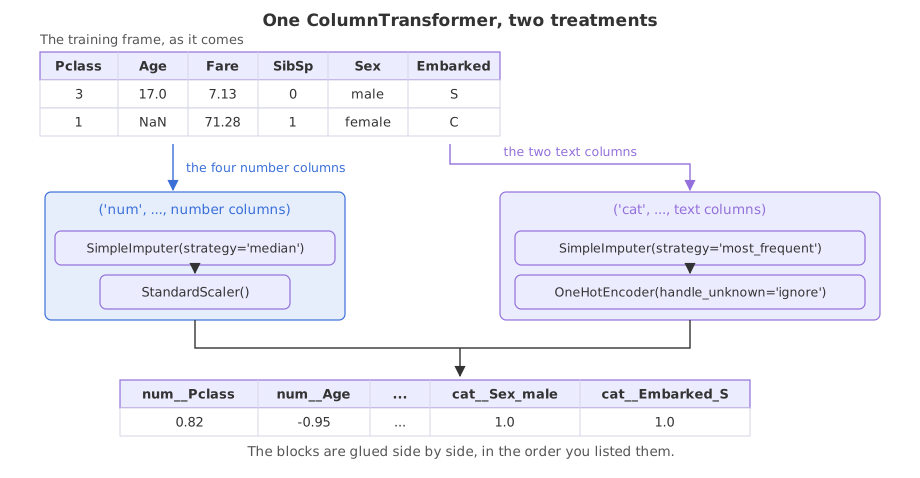
Syntax: each entry is a name, a transform and the columns it applies to.
pre = ColumnTransformer([
    ('num', SimpleImputer(strategy='median'), ['Age', 'Fare']),
    ('cat', OneHotEncoder(handle_unknown='ignore'), ['Sex']),
], remainder='drop')      # what to do with columns no entry claimed
pre.set_output(transform='pandas')   # keep names instead of a bare array
pre.fit_transform(X_train)
What remainder decides
A column no entry names is dropped by default. remainder='passthrough' keeps it untouched, and remainder= can also take a transform. Dropping is the safe default, and it is also the easiest mistake, as the first run shows.
What handle_unknown does
OneHotEncoder(handle_unknown='ignore') answers a label it did not see during fit with a row of zeros instead of raising, which Handling an unknown category works through on its own. On a split it is not a choice: the test half can always carry a label the training half missed.
Running a first version, and reading what it lost
import pandas as pd
from sklearn.compose import ColumnTransformer
from sklearn.impute import SimpleImputer
from sklearn.model_selection import train_test_split
from sklearn.preprocessing import OneHotEncoder

URL = ("https://raw.githubusercontent.com/krishnaik06/"
       "Feature-Engineering-Live-sessions/master/titanic.csv")
df = pd.read_csv(URL)
X = df[['Pclass', 'Age', 'Fare', 'SibSp', 'Sex', 'Embarked']]
y = df['Survived']
X_train, X_test, y_train, y_test = train_test_split(
    X, y, test_size=0.3, random_state=1, stratify=y)
print(X_train.isnull().sum()[lambda s: s > 0].to_string())

pre = ColumnTransformer([
    ('num', SimpleImputer(strategy='median'), ['Age', 'Fare', 'SibSp']),
    ('cat', OneHotEncoder(handle_unknown='ignore', sparse_output=False), ['Sex', 'Embarked']),
], remainder='drop')
pre.set_output(transform='pandas')
out = pre.fit_transform(X_train)
print(type(out).__name__, out.shape)
print(list(out.columns))Age 122 Embarked 2 DataFrame (623, 9) ['num__Age', 'num__Fare', 'num__SibSp', 'cat__Sex_female', 'cat__Sex_male', 'cat__Embarked_C', 'cat__Embarked_Q', 'cat__Embarked_S', 'cat__Embarked_nan']
- Pclass is gone. No entry named it and
remainderis'drop', so a column that matters to the model disappeared without a word. - There is a column called cat__Embarked_nan. Two training passengers have no port, and the encoder treated the gap as a label worth a column of its own.
- The names carry the entry they came from.
num__andcat__prefixes come from the names you gave the entries, which is how you find a column again after the glue.
Filling before encoding, inside the entry
An entry can hold a Pipeline, so each group gets a small chain of its own. Filling the text columns with the most frequent label before the encoder sees them removes the nan column.
words = Pipeline([('fill', SimpleImputer(strategy='most_frequent')),
                  ('code', OneHotEncoder(handle_unknown='ignore', sparse_output=False))])
Choosing columns by dtype instead of by name
make_column_selector picks the columns at fit time by their type, so a new number column is covered without editing a list. Under pandas 3 text columns have the str dtype, which is what dtype_include='str' matches.
from sklearn.compose import make_column_selector

numbers_only = make_column_selector(dtype_include='number')
words_only = make_column_selector(dtype_include='str')
Transforming both halves with one fitted object
import pandas as pd
from sklearn.compose import ColumnTransformer, make_column_selector
from sklearn.impute import SimpleImputer
from sklearn.model_selection import train_test_split
from sklearn.pipeline import Pipeline
from sklearn.preprocessing import OneHotEncoder, StandardScaler

URL = ("https://raw.githubusercontent.com/krishnaik06/"
       "Feature-Engineering-Live-sessions/master/titanic.csv")
df = pd.read_csv(URL)
X = df[['Pclass', 'Age', 'Fare', 'SibSp', 'Sex', 'Embarked']]
y = df['Survived']
X_train, X_test, y_train, y_test = train_test_split(
    X, y, test_size=0.3, random_state=1, stratify=y)

numbers = Pipeline([('fill', SimpleImputer(strategy='median')),
                    ('scale', StandardScaler())])
words = Pipeline([('fill', SimpleImputer(strategy='most_frequent')),
                  ('code', OneHotEncoder(handle_unknown='ignore', sparse_output=False))])
pre = ColumnTransformer([
    ('num', numbers, make_column_selector(dtype_include='number')),
    ('cat', words, make_column_selector(dtype_include='str')),
])
pre.set_output(transform='pandas')
train_out = pre.fit_transform(X_train)
test_out = pre.transform(X_test)
print("train", train_out.shape, "test", test_out.shape)
print(list(train_out.columns))
print(train_out.head(3).round(3).to_string())
print("nulls left:", int(train_out.isnull().sum().sum()), int(test_out.isnull().sum().sum()))
print("modes learned on train:",
pre.named_transformers_['cat'].named_steps['fill'].statistics_)train (623, 9) test (268, 9)
['num__Pclass', 'num__Age', 'num__Fare', 'num__SibSp', 'cat__Sex_female', 'cat__Sex_male', 'cat__Embarked_C', 'cat__Embarked_Q', 'cat__Embarked_S']
num__Pclass num__Age num__Fare num__SibSp cat__Sex_female cat__Sex_male cat__Embarked_C cat__Embarked_Q cat__Embarked_S
472 -0.371 0.307 -0.085 0.410 1.0 0.0 0.0 0.0 1.0
597 0.820 1.562 -0.677 -0.477 0.0 1.0 0.0 0.0 1.0
843 0.820 0.424 -0.539 -0.477 0.0 1.0 1.0 0.0 0.0
nulls left: 0 0
modes learned on train: ['male' 'S']- Nine columns, and Pclass is among them. The selector claimed every number column, so nothing fell through to
remainder. - No nan column. The two empty ports were filled with
S, the most frequent label in the training half, before the encoder built its list. - The test half has the same nine columns.
transformreuses the fitted label list, so the two frames line up even though they were never encoded together. - named_transformers_ reaches inside. It gives you the fitted step by its entry name, so the last line reads the two modes the text fill learned, male and S, without taking the object apart.
ColumnTransformer against doing it by hand
| By hand, column by column | ColumnTransformer | |
|---|---|---|
| Where the fitted numbers live | in whatever variables you named | inside one object, under the entry names |
| Applying it to the test half | repeat every line in the same order | one call to transform |
| A column you forgot | silently stays raw and breaks the model later | dropped or kept by remainder, as you chose |
| A new label in the test half | whatever your code happens to do | handled by handle_unknown |
| Putting it inside cross-validation | not possible without rewriting | it is a step like any other |
Where a ColumnTransformer earns its place
- A table with mixed types. Any file with both numbers and text needs two treatments, and this is the object that keeps them apart.
- A model that will be served. The fitted encoder and the fitted medians travel together, so the serving code cannot apply one without the other.
- A wide table. With eighty columns, naming groups by dtype is the only version anyone can read.
remainder defaults to 'drop', so any column you did not name is thrown away without an error. Print fit_transform(X_train).columns the first time you build one and count them against the columns you meant to keep.Related
- Previous: Split first, then fit
- Next: Pipelines and pandas output
- See also: One hot encoding and Handling an unknown category
- Reference: Pipelines and composite estimators in the scikit-learn documentation
- Change
remainder='drop'toremainder='passthrough'in the first version and look at the names again.Pclasscomes back, asremainder__Pclass. - Swap
strategy='most_frequent'forstrategy='constant', fill_value='Missing'and look at the column names. A tenth column,cat__Embarked_Missing, appears: the gap becomes a label of its own rather than joining the most common port. - Add
drop='first'to the encoder and count the columns. Nine become seven, because each text column loses one, which is the n minus 1 rule a linear model prefers.
Every expert started right here.