
Handling an unknown category
handle_unknown is the OneHotEncoder argument that decides what happens when a category arrives that was not in the data the encoder was fitted on: raise an error, or write a row of zeros and carry on.
Last updated: 12 Oct, 2026 · pandas 3.0 · scikit-learn 1.9
Every encoder so far was built from one frame and applied to that same frame. Mean encoding already needed a fitted object to keep the training means. This lesson is about the moment the second frame arrives, which is the moment a model is used in earnest.
Syntax: fit once on the training rows, then transform anything.
encoder = OneHotEncoder(sparse_output=False, handle_unknown="ignore")
encoder.fit(train[["city"]])            # learns the training categories
encoder.transform(test[["city"]])       # same columns, whatever arrives
encoder.get_feature_names_out()         # the column names it kept
Why get_dummies cannot do this
A function has nothing to remember with
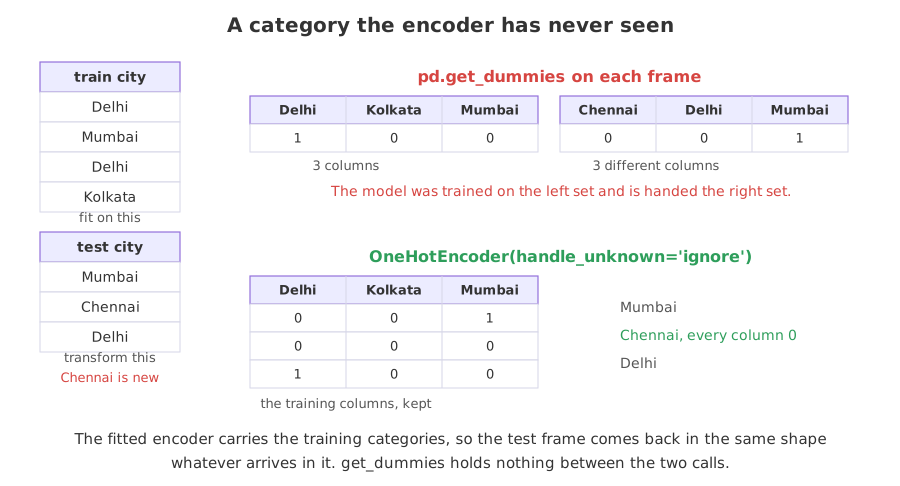
pd.get_dummies reads one frame and returns the columns that frame needs. It holds no state between calls, so two calls on two frames are two independent answers. Nothing connects them and nothing warns that they disagree.
pd.get_dummies(train, dtype=int)   # columns from train
pd.get_dummies(test, dtype=int)    # columns from test, not the same list
The two ways the lists go wrong
A level in the test frame that was not in the training frame adds a column the model has never seen. A level in the training frame that is missing from the test frame takes its column away. Both happen at once on real data.
set(pd.get_dummies(test).columns) - set(pd.get_dummies(train).columns)   # new
set(pd.get_dummies(train).columns) - set(pd.get_dummies(test).columns)   # gone
Two frames, two sets of columns
import pandas as pd

train = pd.DataFrame({"city": ["Delhi", "Mumbai", "Delhi", "Kolkata"]})
test = pd.DataFrame({"city": ["Mumbai", "Chennai", "Delhi"]})

train_cols = pd.get_dummies(train, dtype=int)
test_cols = pd.get_dummies(test, dtype=int)
print("train columns:", list(train_cols.columns))
print("test columns :", list(test_cols.columns))
print("appeared :", sorted(set(test_cols.columns) - set(train_cols.columns)))
print("vanished :", sorted(set(train_cols.columns) - set(test_cols.columns)))
print("same shape:", train_cols.shape[1] == test_cols.shape[1])train columns: ['city_Delhi', 'city_Kolkata', 'city_Mumbai'] test columns : ['city_Chennai', 'city_Delhi', 'city_Mumbai'] appeared : ['city_Chennai'] vanished : ['city_Kolkata'] same shape: True
What the two column lists mean for a model
- Both frames gave three columns. The count matches, which is what makes this so easy to miss: a shape check passes and the columns still disagree.
- city_Chennai appeared. A column the model was never trained on, carrying a coefficient that does not exist.
- city_Kolkata vanished. A column the model expects and will not receive.
- Nothing raised. Depending on what comes next, this ends in a shape error far from the cause, or in silently wrong predictions when the columns are lined up by position.
A fitted encoder, and the default that refuses
OneHotEncoder stores the categories it saw in categories_ when it is fitted, and uses those same categories for every later transform. With the default handle_unknown="error" a category it has not seen stops the program, which is the right behaviour when an unexpected level means something upstream has broken.
import pandas as pd
from sklearn.preprocessing import OneHotEncoder

train = pd.DataFrame({"city": ["Delhi", "Mumbai", "Delhi", "Kolkata"]})
test = pd.DataFrame({"city": ["Mumbai", "Chennai", "Delhi"]})

encoder = OneHotEncoder(sparse_output=False).fit(train)
print("categories kept:", list(encoder.categories_[0]))
encoder.transform(test)categories kept: ['Delhi', 'Kolkata', 'Mumbai']
Traceback (most recent call last):
File "main.py", line 9, in <module>
encoder.transform(test)
ValueError: Found unknown categories ['Chennai'] in column 0 during transformThe encoder named the offending value and the column it was in. That message is worth more than a shape error three functions later, which is why the strict default is a reasonable one.
Ignoring the category instead of raising
handle_unknown="ignore" writes zeros across every column for a row whose category is unknown. That is the same pattern the top-ten trick produces for a rare level, and the same pattern drop="first" produces for the dropped level, so it is a shape the model has already met.
import pandas as pd
from sklearn.preprocessing import OneHotEncoder

train = pd.DataFrame({"city": ["Delhi", "Mumbai", "Delhi", "Kolkata"]})
test = pd.DataFrame({"city": ["Mumbai", "Chennai", "Delhi"]})

encoder = OneHotEncoder(sparse_output=False, handle_unknown="ignore")
encoder.set_output(transform="pandas").fit(train)

print("columns:", list(encoder.get_feature_names_out()))
print(encoder.transform(test).astype(int).to_string())
print("test columns match train columns:",
list(encoder.transform(test).columns) == list(encoder.get_feature_names_out()))columns: ['city_Delhi', 'city_Kolkata', 'city_Mumbai'] city_Delhi city_Kolkata city_Mumbai 0 0 0 1 1 0 0 0 2 1 0 0 test columns match train columns: True
What the fitted encoder returned
- The columns are the training ones. city_Delhi, city_Kolkata and city_Mumbai, in that order, for both frames. city_Kolkata is present and full of zeros although no test row is from Kolkata.
- The Chennai row is all zeros. No column claims it, and no error was raised. The model receives a row it can score.
set_output(transform="pandas")returned a DataFrame. Without it,transformreturns a NumPy array and the column names live only inget_feature_names_out().- The encoder is the thing to save. Pickle it, or put it in a pipeline, and the same categories reach every future row.
Grouping the rare levels instead of dropping them
min_frequency and max_categories fold the rare levels into one column named infrequent_sklearn, which is the top-ten trick as a fitted transformer. With handle_unknown="infrequent_if_exist" an unseen level joins that column rather than coming back as all zeros, so it is treated as rare instead of as nothing.
import pandas as pd
from sklearn.preprocessing import OneHotEncoder

train = pd.DataFrame({"city": ["Delhi", "Mumbai", "Delhi", "Kolkata"]})
test = pd.DataFrame({"city": ["Mumbai", "Chennai", "Delhi"]})

encoder = OneHotEncoder(sparse_output=False, min_frequency=2,
                        handle_unknown="infrequent_if_exist").fit(train)
print("columns:", list(encoder.get_feature_names_out()))
print("levels folded in:", list(encoder.infrequent_categories_[0]))
print(encoder.transform(test).astype(int))columns: ['city_Delhi', 'city_infrequent_sklearn'] levels folded in: ['Kolkata', 'Mumbai'] [[0 1] [0 1] [1 0]]
Reading the infrequent column
- Two columns instead of three. Delhi appears twice and clears
min_frequency=2; Mumbai and Kolkata appear once each and were folded into city_infrequent_sklearn. - Chennai landed in the infrequent column. The unknown city is treated as a rare city, which is a better guess than treating it as no city at all.
- The first test row, Mumbai, also landed there. Mumbai was in the training data and was still rare, so it shares the column with everything else rare.
max_categoriesdoes the same by count. Keep the n most frequent levels and fold the rest, which is what a column with hundreds of levels usually wants.
The three answers to an unseen category
| What the row gets | Use it when | |
|---|---|---|
| handle_unknown='error' | an exception naming the value | an unexpected level means a broken upstream feed |
| handle_unknown='ignore' | zeros in every column | new levels are expected and carry no information you can use |
| handle_unknown='infrequent_if_exist' | a 1 in the infrequent column | the column has a long tail and a new level is probably another rare one |
| pd.get_dummies | a different set of columns, with no error | a one-off exploration where nothing is fitted |
Where an unknown category turns up
- A model in production. New products, new cities, new browsers and new payment methods all arrive after the training set was frozen.
- A train and test split of the same file. A level that appears in 3 rows of 1000 has a good chance of landing entirely on one side of the split.
- Cross validation. Each fold fits its own encoder, so every fold meets levels the others had. An encoder inside a Pipelines and pandas output handles that without any extra code.
Related
- Previous: Mean encoding
- Next: Why features are scaled
- See also: ColumnTransformer
- Reference: sklearn.preprocessing.OneHotEncoder
- Add Chennai to the training frame and run the first example again. The two column lists agree, which is the accident this lesson is about.
- Pass
drop="first"alongsidehandle_unknown="ignore"and work out which rows are now all zeros. - Set
max_categories=2in place ofmin_frequency=2and compare the column names.
This is what real progress feels like.