
Duplicates
A duplicate is a row whose values repeat a row seen earlier in the table, found with duplicated() and removed with drop_duplicates(), and whether a row counts as one depends entirely on which columns you compare.
Last updated: 12 Oct, 2026 · pandas 3.0 · scikit-learn 1.9
Merging a lookup table added a column. This lesson removes rows, and it is the step most audits skip because the obvious check almost always reports nothing. A repeated row is not harmless: it weights those feature values twice in training, and the same row sitting in both the training and the test set reports an accuracy the model has not earned.
Syntax: one method marks the copies and the other removes them, and both take the same two arguments.
df.duplicated()                       # True on the 2nd and later copy of a row
df.duplicated(subset=['a', 'b'])      # compare only these columns
df.duplicated(keep='last')            # mark all but the last copy ('first' is the default)
df.duplicated(keep=False)             # mark every copy, including the first

df.drop_duplicates(subset=[...], keep='first', ignore_index=True)
Why the obvious check finds nothing
duplicated() with no arguments compares every column. On most real tables that includes an identifier, and an identifier is unique by design, so the answer is always zero.
import pandas as pd

TITANIC = ("https://raw.githubusercontent.com/krishnaik06/"
           "Feature-Engineering-Live-sessions/master/titanic.csv")
titanic = pd.read_csv(TITANIC)

print("rows:", len(titanic))
print("whole-row duplicates:", titanic.duplicated().sum())
print("first three columns:", titanic.columns.tolist()[:3])rows: 891 whole-row duplicates: 0 first three columns: ['PassengerId', 'Survived', 'Pclass']
Zero duplicates, and the check cost nothing. It also proved nothing, because PassengerId is 1 to 891 and Name is different for every passenger. Those columns are not features: a model never sees them. The question worth asking is whether two rows look the same to the model.
Comparing only the columns a model sees
subset restricts the comparison to a list of columns. Here it is the eight columns a Titanic model would be trained on, with the identifier, the name, the ticket number and the cabin left out.
features = ['Survived', 'Pclass', 'Sex', 'Age', 'SibSp', 'Parch', 'Fare', 'Embarked']

print("copies, keeping the first :", titanic.duplicated(subset=features).sum())
print("copies, keeping the last  :", titanic.duplicated(subset=features, keep='last').sum())
print("every row that has a twin :", titanic.duplicated(subset=features, keep=False).sum())

pairs = titanic[titanic.duplicated(subset=features, keep=False)]
print(pairs.sort_values(features).head(4)[features].to_string())copies, keeping the first : 111
copies, keeping the last : 111
every row that has a twin : 167
Survived Pclass Sex Age SibSp Parch Fare Embarked
252 0 1 male 62.0 0 0 26.55 S
555 0 1 male 62.0 0 0 26.55 S
633 0 1 male NaN 0 0 0.00 S
815 0 1 male NaN 0 0 0.00 S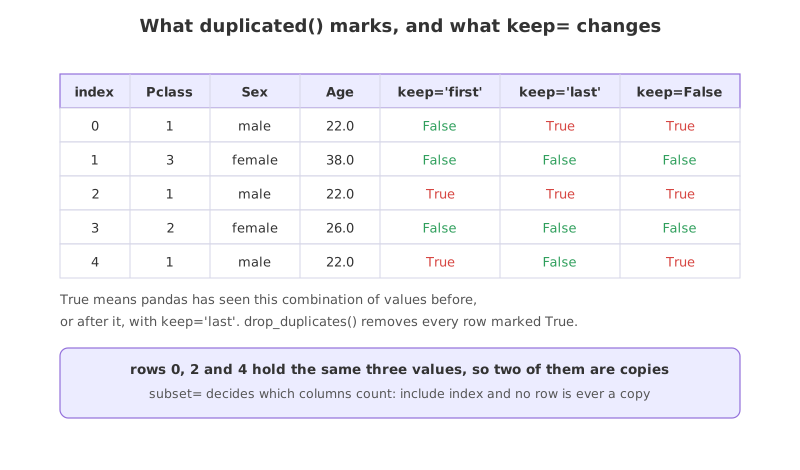
Reading the three counts
- 111 copies with
keep='first', and 111 withkeep='last'. The count of copies does not depend on which one you keep, only on how many groups have more than one member. - 167 rows with
keep=False. This marks every member of every repeated group, originals included, so 167 minus 111 is the 56 groups involved. Use this one to look at the duplicates before deciding anything. - The printed pairs are real passengers. Two first class men aged 62 who both paid 26.55 and boarded at Southampton are two different people whose eight feature values happen to coincide.
- NaN counts as equal to NaN here. Two rows with no recorded age and the same other values are reported as copies, which is the opposite of what
NaN == NaNgives.duplicatedcompares rows, not values.
Deciding whether to drop them
A duplicate is not automatically an error. On the Titanic those 111 rows are different people, and dropping them deletes real passengers. On a table where each row is an event, an order or a sensor reading, two identical rows usually mean the same record arrived twice, and keeping both doubles its weight.
deduped = titanic.drop_duplicates(subset=features, ignore_index=True)

print("before:", titanic.shape, " after:", deduped.shape)
print("rows removed:", len(titanic) - len(deduped))
print("copies left :", deduped.duplicated(subset=features).sum())before: (891, 12) after: (780, 12) rows removed: 111 copies left : 0
- 891 rows become 780. That is 12.5% of the data, far too much to remove without a reason to believe the rows are copies rather than coincidences.
ignore_index=Truerenumbers the surviving rows 0 to 779. Without it the labels keep their old values and the index has gaps in it.- Zero copies left. The check after the drop is worth keeping: it is one line and it proves the operation did what you asked.
- The rule of thumb: drop when the row is a record that was ingested twice, keep when the row is an observation whose few columns happen to agree.
Duplicate index labels, which are a different problem
Stacking two tables creates a second kind of duplicate, in the row labels rather than in the values. pd.concat keeps each frame's original labels, so a training frame numbered 0 to 1459 and a test frame numbered 0 to 1458 give a stacked frame in which most labels appear twice.
import pandas as pd

AMES = "https://raw.githubusercontent.com/krishnaik06/Advanced-House-Price-Prediction-/master/"
train = pd.read_csv(AMES + "train.csv", usecols=['Id', 'MSZoning', 'LotArea'])
test = pd.read_csv(AMES + "test.csv", usecols=['Id', 'MSZoning', 'LotArea'])

stacked = pd.concat([train, test])                      # labels 0..1459 and 0..1458
print("rows:", len(stacked), " index unique:", stacked.index.is_unique)
print("rows carrying the label 5:", len(stacked.loc[5]))
print("len(stacked.drop(5)):", len(stacked.drop(5)))

clean = pd.concat([train, test], ignore_index=True)     # labels 0..2918
print("len(clean.drop(5)) :", len(clean.drop(5)), " index unique:", clean.index.is_unique)rows: 2919 index unique: False rows carrying the label 5: 2 len(stacked.drop(5)): 2917 len(clean.drop(5)) : 2918 index unique: True
- 2919 rows and a non-unique index. Nothing warned. The frame is the right length and the labels are wrong.
stacked.loc[5]returns 2 rows. Selecting by label stops being a way to reach one row.drop(5)removes 2 rows, not 1. Dropping by label removes every row carrying that label, so a line meant to delete one bad record deletes a good one with it, and the row count still looks plausible.ignore_index=Truerenumbers 0 to 2918, and the samedrop(5)then removes exactly one row.
Row duplicates vs index duplicates
| Duplicate rows | Duplicate index labels | |
|---|---|---|
| What repeats | The values in the columns | The row label |
| How it arrives | The same record ingested twice, or a coincidence | pd.concat without ignore_index |
| How to find it | df.duplicated(subset=...).sum() | df.index.is_unique |
| What it breaks | Row weights in training, and the train and test split | .loc selection and drop by label |
| The fix | drop_duplicates(subset=...), when they are real copies | ignore_index=True, or reset_index(drop=True) afterwards |
Where the duplicate check belongs
- Right after reading the file, and again after every concat or merge. Both operations can create duplicates, and the earlier one is found the less work it invalidates.
- Before the train and test split. The same row in both halves gives a test score that is partly a memory test, and no later step can undo it.
- On a subset of key columns, not on everything. An order id, a timestamp and a customer id together say whether a record is a repeat; the whole row rarely does.
df.duplicated().sum() returning 0 is the usual result and it is almost meaningless on a table with an id column. Choose the columns that define a record, pass them as subset, and read the count again before concluding that the table is clean.Related
- Previous: Merging a lookup table
- Next: One chart, one question, one observation
- Reference: DataFrame.duplicated and DataFrame.drop_duplicates
- Add
'Cabin'to the feature list and count the copies again. It falls from 111 to 107: explain why adding a column can only lower the count, never raise it. - Run
titanic.duplicated(subset=['Sex']).sum()and explain the number it gives before you look at it. - Stack the two house price frames without
ignore_indexand runstacked.loc[1458]. Then runstacked.iloc[1458]and say why they differ.
Every expert started right here.