
Turning a duration string into minutes
A duration written as 2h 50m becomes one number, 170 minutes, by pulling the hours and the minutes out of the text and adding them together.
Last updated: 12 Oct, 2026 · pandas 3.0 · scikit-learn 1.9 · openpyxl 3.1
Turning a time into hours and minutes split a value with one fixed shape. Duration has two shapes, 2h 50m and 19h, and one row that is only 5m. Each of those breaks a different part of the obvious solution, which makes it the best column in the dataset to learn on.
A Series is not a string
The first instinct is to call .split() on the column. A Series is a container of values, not one string, so it has no such method. .str is the accessor that applies a string method to every value and hands back a Series of results, and every string step in the chain needs its own .str.
import pandas as pd

BASE = ("https://raw.githubusercontent.com/krishnaik06/5-Days-Live-EDA-and-Featur"
        "e-Engineering/main/Flight%20Prediction/")
train = pd.read_excel(BASE + "Data_Train.xlsx")   # 10683 rows, Price included
test = pd.read_excel(BASE + "Test_set.xlsx")      # 2671 rows, no Price
flights = pd.concat([train, test], ignore_index=True)print(flights['Duration'].head(4).tolist())
flights['Duration'].split(' ')['2h 50m', '7h 25m', '19h', '5h 25m']
Traceback (most recent call last):
File "main.py", line 2, in <module>
flights['Duration'].split(' ')
AttributeError: 'Series' object has no attribute 'split'. Did you mean: 'plot'?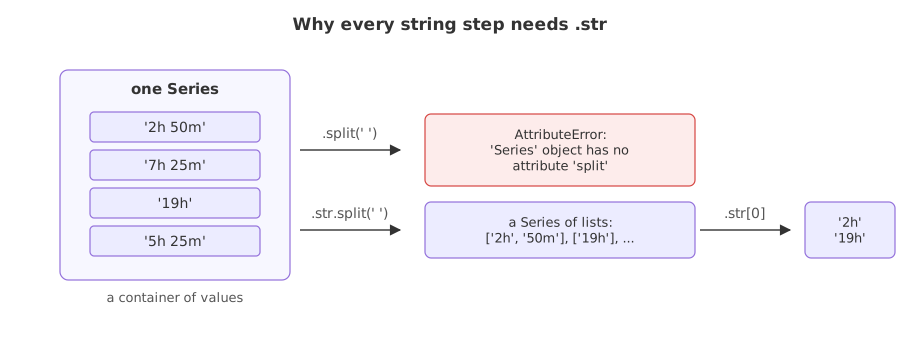
With the accessor, the same call works value by value. .str.split(' ').str[0] keeps the piece before the space, which is 2h, and a second .str.split('h').str[0] cuts the h off it.
hours_text = flights['Duration'].str.split(' ').str[0].str.split('h').str[0]
# '2h 50m' -> '2h' -> '2'   and   '19h' -> '19h' -> '19'
The cast that fails on one value
Casting that column to a number is the next obvious step, and it raises. The message names the value that stopped it, which is the fastest way to find the row.
hours_text = flights['Duration'].str.split(' ').str[0].str.split('h').str[0]
print("looks fine:", hours_text.head(4).tolist())
hours_text.astype(int)looks fine: ['2', '7', '19', '5']
Traceback (most recent call last):
File "main.py", line 3, in <module>
hours_text.astype(int)
ValueError: invalid literal for int() with base 10: '5m'odd = flights[~flights['Duration'].str.contains('h')]
print(odd[['Airline', 'Source', 'Destination', 'Duration']].to_string())Airline Source Destination Duration 6474 Air India Mumbai Hyderabad 5m 13343 Air India Mumbai Hyderabad 5m
- Two rows hold
5mas the whole value. Both are Mumbai to Hyderabad, where the usual duration in this data is 1h 30m. They are bad data, not a shape the parser has to support. - The chain produced
'5m'for them, because there was nohto split on, andint('5m')is what raised. - Dropping two rows out of 13354 is the right call here, and it is a decision to record rather than a fix to hide.
Pulling both parts out with one pattern
Splitting twice handles the hours and loses the minutes. .str.extract takes a regular expression with named groups and returns one column per group, filling a group that did not match with NaN. One pattern then covers both shapes at once.
pattern = r'(?:(?P<hours>\d+)h)?\s*(?:(?P<minutes>\d+)m)?'
parts = flights['Duration'].str.extract(pattern)
# '2h 50m' -> hours '2', minutes '50'
# '19h'    -> hours '19', minutes NaN
# '5m'     -> hours NaN,  minutes '5'
The two optional groups are what make it work. (?:...) groups without capturing, the trailing ? makes that group optional, and (?P<hours>\d+) captures one or more digits under the name hours.
parts = parts.astype(float).fillna(0)                  # a missing part is zero
flights['Duration_mins'] = parts['hours'] * 60 + parts['minutes']
flights = flights.drop(columns='Duration')
Every duration as one number
import matplotlib.pyplot as plt

pattern = r'(?:(?P<hours>\d+)h)?\s*(?:(?P<minutes>\d+)m)?'
parts = flights['Duration'].str.extract(pattern).astype(float).fillna(0)
flights['Duration_mins'] = parts['hours'] * 60 + parts['minutes']
flights = flights.drop(columns=['Duration'])

print(parts.head(4).to_string())
print("\nminutes:", flights["Duration_mins"].head(4).tolist())
print("shortest:", flights["Duration_mins"].min(), " longest:", flights["Duration_mins"].max())
print("median  :", flights["Duration_mins"].median())

fig, ax = plt.subplots(figsize=(7, 3.4))
ax.hist(flights['Duration_mins'], bins=60, range=(0, 1800), color='#3a6fd8')
ax.set_xlabel('duration in minutes'); ax.set_ylabel('flights')
ax.set_title('Flight duration once the text is a number')
fig.tight_layout()hours minutes 0 2.0 50.0 1 7.0 25.0 2 19.0 0.0 3 5.0 25.0 minutes: [170.0, 445.0, 1140.0, 325.0] shortest: 5.0 longest: 2860.0 median : 520.0
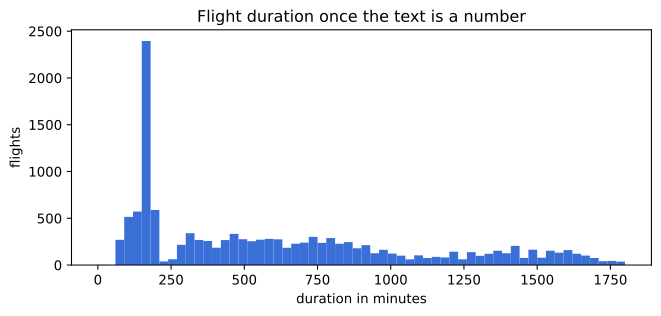
Reading the parsed durations
- The extract gives two columns, hours and minutes, with NaN where a part was absent.
fillna(0)is correct here because a missing part means zero of it. - The shortest is 5 minutes and the longest is 2860, a little under two days. Both ends deserve a look before they are trusted.
- The median is 520 minutes, which is why the histogram is crowded at the left: most flights are short and a tail of connecting itineraries runs on for days.
- The column is now one number per row, so it can be scaled, transformed or split into bands. As text it could do none of those.
Splitting compared with extracting
.str.split chain | .str.extract with a pattern | |
|---|---|---|
| Covers two shapes | no, one chain per shape | yes, optional groups |
| Missing part | silently gives the wrong piece | NaN, which you decide what to do with |
| Output | one Series per call | one DataFrame, one column per group |
| Readable | yes, for a simple separator | needs a regular expression |
| Use it for | a fixed separator and a fixed shape | optional or repeated pieces |
Where duration parsing is used
- Travel and logistics data, where journey and delivery times arrive as text in whatever shape the source system prints.
- Media and session lengths, written as
1h 32mor00:45:10. - Support and incident logs, where time to resolution is the thing being predicted and arrives as a human readable string.
.str.extract with a pattern whose groups are all optional matches an empty string, so a row that fits nothing comes back as NaN in every column and fillna(0) turns it into a duration of zero. Count the zeros after parsing. Here there are none, because every row has at least an hour part or a minute part.Related
- Previous: Turning a time into hours and minutes
- Next: When to drop a feature instead of engineering it
- See also: Why features are scaled
- Reference: Extracting substrings in the pandas docs
- Count
(flights['Duration_mins'] == 0).sum()after parsing. It is zero here; add a row of'unknown'to the column and watch it become one. - Keep
hoursandminutesas two separate features instead of adding them, and compare how many distinct values each version has. - Change
fillna(0)tofillna(-1)and look at the minimum. The parse is the same; only the decision about a missing part changed.
Every expert started right here.