
Merging a lookup table
A lookup table is a small second table that maps a code to its meaning, and DataFrame.merge is the call that attaches it to the main table by matching on a shared column.
Last updated: 12 Oct, 2026 · pandas 3.0 · scikit-learn 1.9
The missing value map audited the holes in the Zomato table. One of its columns, Country Code, holds numbers like 1, 30 and 216 that mean nothing on their own. The archive ships a second file that translates them, and this lesson joins the two.
Syntax: merge takes the other frame, the column to match on, and the rule for which rows to keep.
left.merge(right,
           on='Country Code',   # a column with this name must exist in both frames
           how='left')          # keep every row of left; 'inner', 'right' and 'outer' differ
Reading the lookup out of the archive
The lookup is an Excel file, not a CSV, so read_excel reads it. It opens from the zip the same way, and openpyxl does the decoding, so there is no encoding argument to choose this time.
with zf.open('Country-Code.xlsx') as fh:
    codes = pd.read_excel(fh)

print(codes.shape)
print(codes.head(8).to_string())(15, 2) Country Code Country 0 1 India 1 14 Australia 2 30 Brazil 3 37 Canada 4 94 Indonesia 5 148 New Zealand 6 162 Phillipines 7 166 Qatar
- 15 rows and 2 columns. A lookup is small by nature: one row per code.
Country Codeis in both frames, with the same name and the sameint64type. That is what makes the join possible.- The names come from the source file as it is. Row 6 spells the Philippines with two l's and one p, and the right place to correct a value like that is after the merge, with a
replaceon the new column.
Attaching the names
merge matches every row of the left frame against the lookup on the key column, and adds the lookup's other columns to it. how='left' means every row of the left frame survives, whether or not the lookup had a match for it.
final_df = df.merge(codes, on='Country Code', how='left')

print("before:", df.shape, " after:", final_df.shape)
print("rows with no country name:", final_df['Country'].isnull().sum())
print(final_df['Country'].value_counts().head(3).to_string())before: (9551, 21) after: (9551, 22) rows with no country name: 0 Country India 8652 United States 434 United Kingdom 80
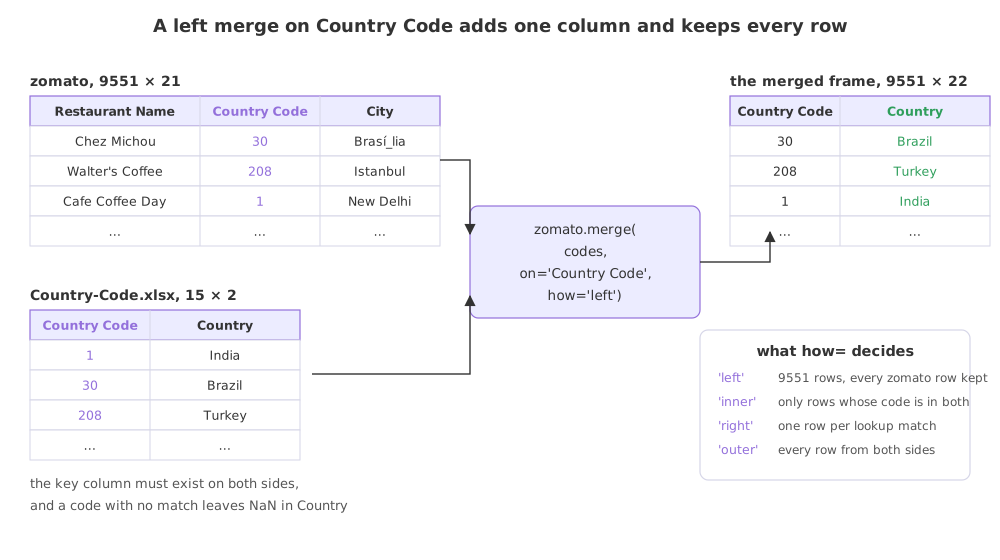
What the merge changed
- 21 columns became 22. The key column is not duplicated; only
Countryis added. - 9551 rows became 9551 rows. That is the result to check for. A left merge preserves the row count only when each key matches at most one lookup row.
- No row ended with an empty
Country. Every code in the table was present in the lookup. A non-zero count here would mean codes the lookup does not cover, and the left merge keeps those rows with NaN rather than dropping them. - 8652 of the 9551 restaurants are in India. A fact that was unreadable as the number 1 and is obvious as a name. Making a column readable is the whole purpose of the join.
Choosing how the rows are matched
how decides which rows survive when the two sides do not line up. To see the difference, here is the same merge against a lookup trimmed to three of its fifteen codes.
three = codes.head(3)                      # a lookup that covers only three codes
print("codes in the lookup:", three['Country Code'].tolist())

for how in ['left', 'inner', 'right', 'outer']:
    merged = df.merge(three, on='Country Code', how=how)
    print(f"how={how:7} {merged.shape[0]:5d} rows  "
f"{merged['Country'].isnull().sum():5d} with no country")codes in the lookup: [1, 14, 30] how=left 9551 rows 815 with no country how=inner 8736 rows 0 with no country how=right 8736 rows 0 with no country how=outer 9551 rows 815 with no country
'left'keeps all 9551 rows and leaves 815 of them with no country name, because their code is not in the trimmed lookup. This is what you want when the lookup is extra information and the main table is the data.'inner'keeps 8736 rows, the ones whose code the lookup covers. The other 815 are gone, and nothing says so. An inner join is the quietest way to lose rows in pandas.'right'keeps the same 8736 here, because each of the three codes matches at least one restaurant. A right join returns one row per match on the right side, so a lookup row with no match would appear once with empty restaurant columns.'outer'keeps 8736 plus the 815 unmatched, which is all 9551 again, and would also keep any lookup row that matched nothing.
left vs inner vs right vs outer
how | Rows kept | Row count here | Use it when |
|---|---|---|---|
'left' | Every row of the left frame | 9551 | The lookup adds information to data you must not lose |
'inner' | Only rows matched on both sides | 8736 | A row without a match is useless to you |
'right' | Every row of the right frame, matched | 8736 | The right frame is the one driving the result |
'outer' | Every row of both sides | 9551 | You are reconciling two sources and want to see what is in one and not the other |
Where a lookup merge is used
- A coded column. Country codes, product codes, store ids and status flags are stored as numbers and mean nothing until a lookup is attached.
- Adding a feature from another table. Population per city, average income per postcode, a category per product: each is a merge on a key.
- Checking a key. Merging and then counting the empty cells in the new column is the quickest test of whether two tables agree on their keys.
shape before and after every merge. If the right frame has more than one row per key, the merge multiplies rows instead of adding a column, and a table of 9551 can come back as 40000 with no warning. validate='many_to_one' makes pandas raise instead.Related
- Previous: The missing value map
- Next: Duplicates
- Reference: Merge, join, concatenate and compare in the pandas user guide
- Add
validate='many_to_one'to the working merge. It passes. Then duplicate a row ofcodeswithpd.concat([codes, codes.head(1)])and watch it raise. - Pass
indicator=Trueand printmerged['_merge'].value_counts()to see which side each row came from. - Correct the misspelled country name on the merged frame with
final_df['Country'] = final_df['Country'].replace({'Phillipines': 'Philippines'})and count the rows it changed.
This is what real progress feels like.