
Turning a time into hours and minutes
A clock time such as 22:20 becomes two numeric features, the hour and the minute, because the text itself cannot be compared or added.
Last updated: 12 Oct, 2026 · pandas 3.0 · scikit-learn 1.9 · openpyxl 3.1
Splitting a date into columns turned one date into three numbers. The two time columns need the same treatment and one extra step, because some of the arrival times carry a date on the end: 01:10 22 Mar means the flight landed the next day.
Working on fields of the same kind together
Dep_Time and Arrival_Time hold the same kind of value and need the same recipe, so they are handled one after the other rather than in the order the columns happen to sit in. That habit is what keeps a long feature pass readable.
import pandas as pd

BASE = ("https://raw.githubusercontent.com/krishnaik06/5-Days-Live-EDA-and-Featur"
        "e-Engineering/main/Flight%20Prediction/")
train = pd.read_excel(BASE + "Data_Train.xlsx")   # 10683 rows, Price included
test = pd.read_excel(BASE + "Test_set.xlsx")      # 2671 rows, no Price
flights = pd.concat([train, test], ignore_index=True)
Cutting the trailing date off an arrival time
Splitting on a space and keeping the first piece leaves 01:10 from 01:10 22 Mar, and leaves 13:15 untouched, because a value with no space splits into a list of one.
flights['Arrival_Time'] = flights['Arrival_Time'].str.split(' ').str[0]Splitting the clock time on the colon
The hour is before the colon and the minute is after it. Both pieces are cast, because '05' and '5' are different strings and the same number.
clock = flights['Arrival_Time'].str.split(':')
flights['Arrival_hour'] = clock.str[0].astype(int)
flights['Arrival_min'] = clock.str[1].astype(int)
flights = flights.drop(columns='Arrival_Time')
Building four columns out of two time columns
print("raw arrival times:", flights['Arrival_Time'].head(4).tolist())
carry_a_date = flights['Arrival_Time'].str.contains(' ')
print("rows carrying a date:", int(carry_a_date.sum()), "of", len(flights))

flights['Arrival_Time'] = flights['Arrival_Time'].str.split(' ').str[0]
for source, prefix in [('Arrival_Time', 'Arrival'), ('Dep_Time', 'Dept')]:
    clock = flights[source].str.split(':')
    flights[prefix + '_hour'] = clock.str[0].astype(int)
    flights[prefix + '_min'] = clock.str[1].astype(int)
    flights = flights.drop(columns=source)

print(flights[['Arrival_hour', 'Arrival_min', 'Dept_hour', 'Dept_min']].head(4).to_string())
print("\nhour range:", flights["Dept_hour"].min(), "to", flights["Dept_hour"].max())
print("minute values:", sorted(flights["Dept_min"].unique().tolist()))raw arrival times: ['01:10 22 Mar', '13:15', '04:25 10 Jun', '23:30'] rows carrying a date: 5401 of 13354 Arrival_hour Arrival_min Dept_hour Dept_min 0 1 10 22 20 1 13 15 5 50 2 4 25 9 25 3 23 30 18 5 hour range: 0 to 23 minute values: [0, 5, 10, 15, 20, 25, 30, 35, 40, 45, 50, 55]
- 5401 of the 13354 arrival times carry a date. Those are the overnight flights. Without the first split,
'01:10 22 Mar'.split(':')would hand'10 22 Mar'to the cast and it would raise. - The loop does the same four lines twice. Two columns of the same kind get one recipe, which is the habit the chapter is built on.
- Hours run 0 to 23 and minutes take twelve values, all multiples of five. Airlines publish times on a five minute grid, and a model sees that as twelve levels rather than sixty.
The same split with to_datetime
A clock time is a time, so pandas can parse it and hand back the parts. The result is identical, and the parse also refuses a value that is not a time instead of producing a wrong number in silence.
clock = pd.to_datetime(flights['Dep_Time'], format='%H:%M')
flights['Dept_hour'] = clock.dt.hour
flights['Dept_min'] = clock.dt.minuteimport matplotlib.pyplot as plt
clock = pd.to_datetime(flights['Dep_Time'], format='%H:%M')
by_split = flights['Dep_Time'].str.split(':').str[0].astype(int)
print("the two routes agree:", bool((clock.dt.hour == by_split).all()))
per_hour = clock.dt.hour.value_counts().sort_index()
print("busiest hour:", int(per_hour.idxmax()), "with", int(per_hour.max()), "departures")
print("quietest hour:", int(per_hour.idxmin()), "with", int(per_hour.min()), "departures")
fig, ax = plt.subplots(figsize=(7.5, 3.4))
ax.bar(per_hour.index, per_hour.values, color='#3a6fd8')
ax.set_xticks(range(0, 24, 2))
ax.set_xlabel('departure hour'); ax.set_ylabel('flights')
ax.set_title('Departures by hour of the day')
fig.tight_layout()the two routes agree: True busiest hour: 9 with 1152 departures quietest hour: 3 with 30 departures
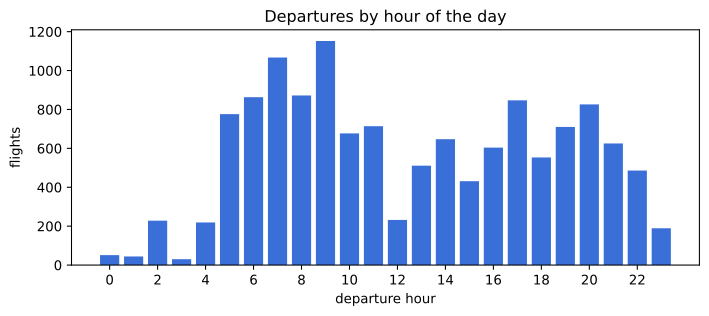
- The hour from the split and the hour from the parse match on every row.
- The counts carry a pattern. The quietest hour, three in the morning, has 30 departures and the busiest, nine, has 1152, so the hour is information a model can use.
- The chart also shows why the next lesson exists. Hour 23 and hour 0 are next to each other on a clock and at opposite ends of this axis.
Splitting the string compared with parsing the time
.str.split(':') | pd.to_datetime(format='%H:%M') | |
|---|---|---|
Handles 01:10 22 Mar | only after the trailing date is cut off | only after the trailing date is cut off |
| A value that is not a time | casts to a wrong number or raises on astype | raises, naming the value |
| Gives | the pieces you index | .dt.hour, .dt.minute, .dt.second |
| Speed on 13354 rows | two passes over the text | one parse, then attribute reads |
| Use it for | an odd pattern a parser does not know | anything that is a real clock time |
Where hour and minute features are used
- Fare and demand models. A six in the morning departure and a six in the evening departure sell at different prices.
- Server and traffic logs, where the hour of the request is often the strongest single feature in the table.
- Shift and staffing data, where the minute rarely matters and the hour always does.
astype(int) raises IntCastingNaNError the moment one value is NaN, because there is no integer that means missing. Fill the column first, or cast to the nullable 'Int64' type, which holds pd.NA alongside whole numbers.Related
- Previous: Splitting a date into columns
- Next: Turning a duration string into minutes
- See also: Cyclical encoding for hours and weekdays
- Reference: Time and date components in the pandas docs
- Remove the
.str.split(' ').str[0]line and run the rest. The cast raises, and the message names the value it choked on. - Build
Dept_minutes_from_midnight = Dept_hour * 60 + Dept_min, one column instead of two, and compare how many values each version has. - Count how many arrival times carry a date for each airline with
groupby('Airline').
This is what real progress feels like.