
Pipelines and pandas output
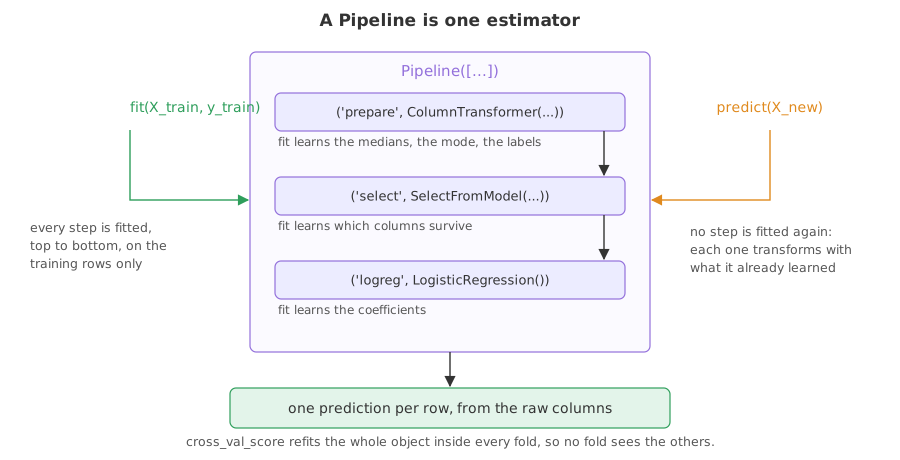
A Pipeline is a list of named steps that behaves as one estimator: fit runs every step in order on the training rows, and predict reuses what they learned.
Last updated: 12 Oct, 2026 · pandas 3.0 · scikit-learn 1.9
ColumnTransformer put the preparation of a mixed table into one object. A Pipeline puts the preparation and the model into one object, which is what makes the split rule hold by construction: there is only one fit call, and it is given the training rows.
Syntax: every step but the last is a transform; the last one can be a model.
model = Pipeline([
    ('prepare', pre),                              # a transform
    ('logreg', LogisticRegression(max_iter=1000))  # the estimator at the end
])
model.fit(X_train, y_train)   # fits every step, in order
model.score(X_test, y_test)   # transforms with what they learned, then scores
Turning on pandas output for every step
By default a scikit-learn transform returns a plain array and the column names are lost after the first step. set_config(transform_output="pandas") makes every transform in the process return a DataFrame instead, which removes the pd.DataFrame(scaler.transform(...), columns=...) dance and makes the middle of a pipeline readable.
from sklearn import set_config

set_config(transform_output="pandas")   # for every transform in this process
# per object instead: step.set_output(transform="pandas")
Assembling the steps
The preparation is the ColumnTransformer from the previous lesson. The model goes on the end, and the whole thing is one object with a name per step.
numbers = Pipeline([('fill', SimpleImputer(strategy='median')),
                    ('scale', StandardScaler())])
words = Pipeline([('fill', SimpleImputer(strategy='most_frequent')),
                  ('code', OneHotEncoder(handle_unknown='ignore', sparse_output=False))])
pre = ColumnTransformer([
    ('num', numbers, make_column_selector(dtype_include='number')),
    ('cat', words, make_column_selector(dtype_include='str')),
])
model = Pipeline([('prepare', pre), ('logreg', LogisticRegression(max_iter=1000))])
Fitting, scoring and looking inside
import pandas as pd
from sklearn import set_config
from sklearn.compose import ColumnTransformer, make_column_selector
from sklearn.impute import SimpleImputer
from sklearn.linear_model import LogisticRegression
from sklearn.model_selection import train_test_split, cross_val_score
from sklearn.pipeline import Pipeline
from sklearn.preprocessing import OneHotEncoder, StandardScaler

set_config(transform_output="pandas")

URL = ("https://raw.githubusercontent.com/krishnaik06/"
       "Feature-Engineering-Live-sessions/master/titanic.csv")
df = pd.read_csv(URL)
X = df[['Pclass', 'Age', 'Fare', 'SibSp', 'Sex', 'Embarked']]
y = df['Survived']
X_train, X_test, y_train, y_test = train_test_split(
    X, y, test_size=0.3, random_state=1, stratify=y)

numbers = Pipeline([('fill', SimpleImputer(strategy='median')),
                    ('scale', StandardScaler())])
words = Pipeline([('fill', SimpleImputer(strategy='most_frequent')),
                  ('code', OneHotEncoder(handle_unknown='ignore', sparse_output=False))])
pre = ColumnTransformer([
    ('num', numbers, make_column_selector(dtype_include='number')),
    ('cat', words, make_column_selector(dtype_include='str')),
])
model = Pipeline([('prepare', pre), ('logreg', LogisticRegression(max_iter=1000))])

model.fit(X_train, y_train)
print("test accuracy:", round(model.score(X_test, y_test), 4))
print("steps:", list(model.named_steps))
middle = model[:-1].transform(X_test)
print("what the model sees:", type(middle).__name__, middle.shape)
print(middle.head(2).round(3).to_string())
scores = cross_val_score(model, X, y, cv=5)
print("five fold accuracy:", scores.round(4).tolist())
print("mean:", round(scores.mean(), 4))
raw = X_test.iloc[[0]]
print(raw.to_string())
print("predicted survival:", int(model.predict(raw)[0]))test accuracy: 0.7724
steps: ['prepare', 'logreg']
what the model sees: DataFrame (268, 9)
num__Pclass num__Age num__Fare num__SibSp cat__Sex_female cat__Sex_male cat__Embarked_C cat__Embarked_Q cat__Embarked_S
433 0.820 -0.948 -0.525 -0.477 0.0 1.0 0.0 0.0 1.0
221 -0.371 -0.164 -0.399 -0.477 0.0 1.0 0.0 0.0 1.0
five fold accuracy: [0.7765, 0.7865, 0.7809, 0.7865, 0.8258]
mean: 0.7913
Pclass Age Fare SibSp Sex Embarked
433 3 17.0 7.125 0 male S
predicted survival: 0- One fit, one score. No separate imputer, scaler or encoder is left lying around to be applied in the wrong order later.
- model[:-1] is the preparation. Slicing a pipeline gives a pipeline, so you can transform a frame and read exactly what the model was given, with its column names intact.
- cross_val_score refits the whole object per fold. The five numbers come from five separate fits, each with its own medians, mode and label list, so no fold prepared itself with the others.
- The last two lines take a raw passenger. Six original columns, one of them text, straight into
predict. That is what a served model needs.
Putting the feature selection inside the pipeline
Cross-validation is where leakage is easiest to miss, because the splitting is hidden inside the call. A selection done once, before cross_val_score, has already seen every fold's test rows. The same selection written as a step is refitted inside each fold. The data below is random noise again, so the honest answer is chance.
import numpy as np
import pandas as pd
from sklearn.feature_selection import SelectKBest, f_classif
from sklearn.linear_model import LogisticRegression
from sklearn.model_selection import cross_val_score
from sklearn.pipeline import Pipeline

rng = np.random.default_rng(0)
X = pd.DataFrame(rng.normal(size=(200, 2000)),
                 columns=[f"f{i}" for i in range(2000)])
y = pd.Series(rng.integers(0, 2, size=200))

# the selection happens once, outside, over every row
chosen = SelectKBest(f_classif, k=10).fit(X, y)
X_small = chosen.transform(X)
print("selected outside:", round(cross_val_score(LogisticRegression(), X_small, y, cv=5).mean(), 4))

# the selection is a step, so it is refitted inside each fold
inside = Pipeline([('select', SelectKBest(f_classif, k=10)),
                   ('logreg', LogisticRegression())])
print("selected inside :", round(cross_val_score(inside, X, y, cv=5).mean(), 4))selected outside: 0.765 selected inside : 0.55
0.765 against 0.55 on data with no signal in it. The only difference is whether the selection could see the rows it was about to be scored on. Any step that learns anything belongs inside the pipeline, which is the practical reason to build one.
A pipeline against loose steps
| Loose transforms and a model | One Pipeline | |
|---|---|---|
| Number of fit calls to get right | one per transform, in order | one |
| Order mistakes | possible, and silent | fixed by the step list |
| Cross-validation | leaks unless you rebuild it per fold | honest by construction |
| Grid search over a preparation choice | hand written loops | parameters are named, such as prepare__num__fill__strategy |
| Serving one row | re-run every step by hand | predict on the raw row |
Where a pipeline is the only sane option
- Any score you will quote. Cross-validation around a pipeline is the cheapest honest number you can produce.
- Any search over preparation choices. Median against mean, with scaling against without: these become parameters of one object, searchable in the same grid as the model's.
- Anything that leaves your notebook. One fitted object can be saved and loaded, and it carries every learned number with it.
fit. Pass unfitted objects and let the pipeline do the fitting, otherwise you are keeping two versions of the same step in your head.Related
- Previous: ColumnTransformer
- Next: Project: the house price data
- See also: Data leakage
- Reference: Pipeline in the scikit-learn documentation
- Print
model.get_params()and find the keyprepare__num__fill__strategy. Set it to'mean'withmodel.set_params(...), refit and score again. - Delete the
set_configline and printtype(middle). It becomes a numpy array and the column names are gone. - Change
k=10tok=2000in both halves of the second example. With every column kept there is nothing to choose, and both lines print 0.45.
Little by little, you're building something great.